


Dale_Rosema
23-Emerald III
23-Emerald III
September 27, 2018
Question

Regenerated or Not Regenerated.....

  • September 27, 2018
  • 4 replies
  • 8330 views

Just move to Creo 4.0 from WF5.0

The assembly being worked on is regenerated (Ctrl-G) and the message bar displays "Automatic regeneration of the parts has been completed."  (Sometime I regenerated multiple time to really make sure it is regenerated.)

When the part is being saved, the following error is displayed:
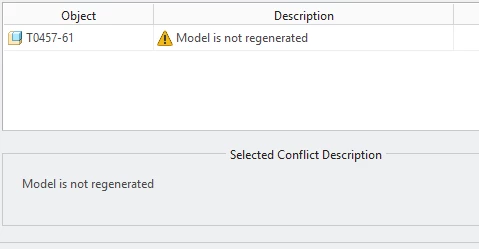
NotRegenerated.PNG


Any thoughts on this dilemma of regenerated or not?

This topic has been closed for replies.

4 replies

Dale_Rosema
23-Emerald III
23-Emerald III
September 27, 2018

Is there a way to find out what is causing the error during the save? I tried clicking on the error message, but is doesn't have a link. Is there some other files, link, .... to tell me (and the software) what the issue is?

21-Topaz II
September 27, 2018

The first thing I'd check for is a circular reference error.  If there, find the *.crc file on disk and examine it for what's causing the error. Typically it's an order of operations thing and reordering features or components will fix it.


If that's not it, I'd start narrowing the scope by dragging the insert bar halfway up the tree, regenerating and trying to save.  If it saves without the error, your problem is in the second half of the tree, if not it's in the first half.  Either way, you move the insert bar to either suppress half or resume half of the problem components.  Once you narrow it down to a single component, you may have to open it and do the same there.


I had a situation like this recently.  It came down to relations driving a pattern on a single part.  The pattern was a curve feature where there was parameter driven text in the curve and the value of the parameter changed based on the pattern instance.  Essentially the relations meant that the parameter value was never right since it changed at every regeneration.  I set the features to read only and that fixed it.

Dale_Rosema
23-Emerald III
23-Emerald III
September 27, 2018

I dragged the insert bar up & down per the recommendation on this post:


https://community.ptc.com/t5/Assembly-Design/Parameter-PTC-COMPONENT-SETS-has-invalid-set-name-s-Set/m-p/573690/highlight/false#M19193


and still have not been able to locate the error. There are no .crc files in the folder. Would something in mass properties cause this issue? (Grabbing at straws here.)

23-Emerald IV
September 27, 2018

So with everything in the assembly suppressed it still throws the error???  Are you using Pro/Program in the assembly?

Dale_Rosema
23-Emerald III
23-Emerald III
September 27, 2018

Moved the insert again. Now it is happening after a dowel insert from a family table of dowels.

Open the dowel. The family table has been verified. Regenerated with now errors.

Tried the assembly just after the dowel and still get the error.

21-Topaz II
September 27, 2018

So, insert bar above the dowel it saves without error and insert bar after the dowel it throws the error, correct?


Does the dowel by itself regenerate and save without error?


Any parent child relationships in the assy between this dowel and other parts, aside from placement refs?


Is this the only assy containing this dowel with this problem?


The relations you listed will require a double regen to save without error unless they are in the post regeneration relations area.

23-Emerald III
September 27, 2018

Do you have a relation that drives a weight parameter in this part? Something like weight=&pro_mp_mass

I remember some time back that when this relation was present, parts would tend to throw errors like this if they were locked (as in PDMLink locked in the workspace).

Dale_Rosema
23-Emerald III
23-Emerald III
September 27, 2018

/*creates MASS and VOLUME using MASS_PROP_1 feature
MASS=MASS:FID_MASS_PROP_1
VOLUME=VOLUME:FID_MASS_PROP_1


(In most but not all parts/assemblies)

14-Alexandrite
September 28, 2018

@Dale_Rosema wrote:

/*creates MASS and VOLUME using MASS_PROP_1 feature
MASS=MASS:FID_MASS_PROP_1
VOLUME=VOLUME:FID_MASS_PROP_1


(In most but not all parts/assemblies)


I have seen regen issues with things like that.  Have fixed in the past with statements like this; tests values before updating them, so file isn't needlessly marked as changed every time relations are evaluated:

if MASS!=MASS:FID_MASS_PROP_1
MASS=MASS:FID_MASS_PROP_1
endif

if VOLUME!=VOLUME:FID_MASS_PROP_1
VOLUME=VOLUME:FID_MASS_PROP_1
endif