1-Visitor
May 16, 2016
Solved

Repeat region override?

  • May 16, 2016
  • 4 replies
  • 9902 views

Happy Monday all!

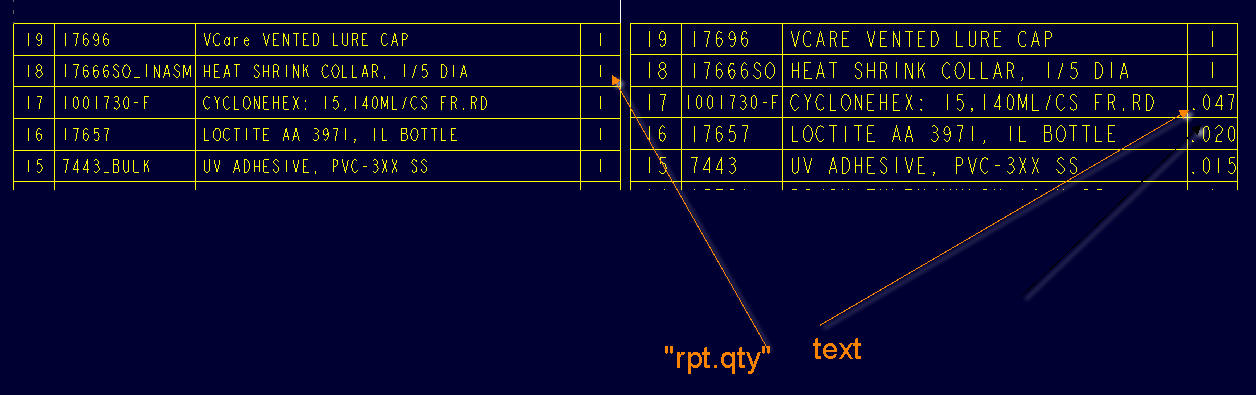
I have an assembly drawing with a repeat region table. Three of the components are bulk items, which represent adhesives used in the assembly. In this situation our practice is to call out the volume used. See the pic below. The table on the right shows the old table, which was just dumb text, and which I am in the process of replacing with the parametric one on the left. Trouble is of course,  "rpt.qty" has to return an integer value.

Does anyone know how to override this value? I tried it by adding it as 3 text rows and of course I have to add the item number as text as well, and then it doesn't sort it amongst the other rows in the table, because the other item numbers are integer parameters read from the components. I don't want to reorder the other parts in order to keep the 3 text rows at the top.

Anyone else have any ideas?
gward- 2016-05-16 09-09-02.jpg


This thread is inactive and closed by the PTC Community Management Team. If you would like to provide a reply and re-open this thread, please notify the moderator and reference the thread. You may also use "Start a topic" button to ask a new question. Please be sure to include what version of the PTC product you are using so another community member knowledgeable about your version may be able to assist.
Best answer by GrahameWard

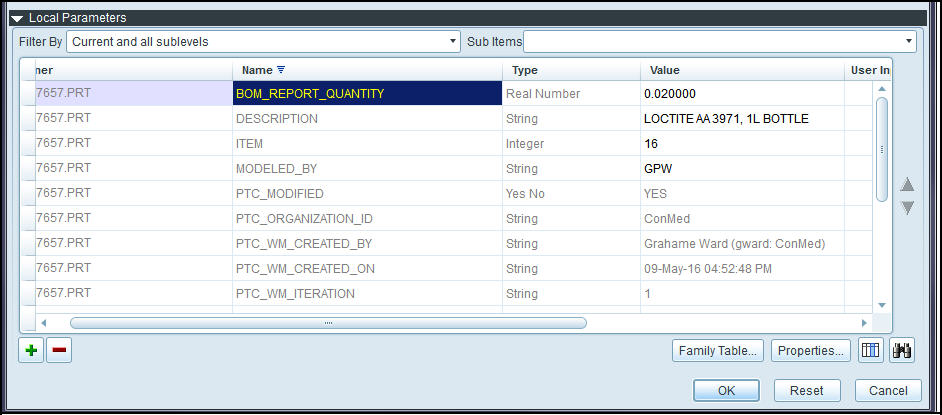
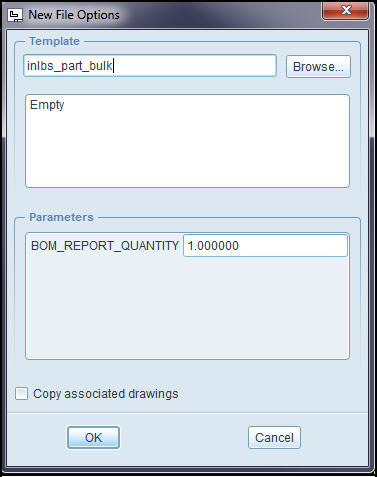
Hmmm. It's working now. I have a parameter in my bulk item parts that has now magically appeared, called "BOM_REPEAT_QUANTITY".  It comes from the default start part for bulk items. See below:

gward- 2016-05-16 13-47-39.jpg

All I did was open the bulk part and enter a value into the field (real number). I even made a test assembly and added a few bulk items as well as one part, then created a test drawing with my standard BOM table. I didn't add a relation to the repeat region in the drawing, just left it the way it is. It gives values for rpt.qty but substitutes the number in "BOM_REPEAT_QUANTITY" when the file has that paramter.

The really cool thing is, if you add the bulk item more than once, it multiplies out the value by the number of times the bulk item is inserted.
gward- 2016-05-16 13-42-12.jpg

4 replies

12-Amethyst
May 16, 2016

Grahame,

Sorry I don't have the time to specifically answer your question but I have supplied a text file for the bom repeat regions I use.

This should help guide you to your answer.

ron

1-Visitor
May 16, 2016

Thanks Ron, having trouble deciphering that text file but I will persevere.

12-Amethyst
May 16, 2016

Grahame,

Dale and I provided basically the same thing.

once you get by the syntax, it should be clear(er)

in a nutshell,

I made "a" equal to "b" in the bom relations

if i need to change "b", i do so

then I report "b" in the bom table

ron

Dale_Rosema
23-Emerald III
23-Emerald III
May 16, 2016

Is that a value that you can tie to a parameter or does is fluctuate from part to part?

I set this up for parts less that "1" in some of my bill of material. See this discussion: Re: 1/2 of a part

1-Visitor
May 16, 2016

It's not. "Rpt.qty" is a default parameter (?) which simply returns an integer value corresponding to the number of that component in the assembly.

I will look at the thread you linked to.

1-Visitor
May 16, 2016

I went to that thread and did what Doug did, but get an error:

Invalid symbol 'asm_mbr_type' found.

23-Emerald IV
May 16, 2016

I didn't look at what Ron sent you, but basically you have to write a repeat region relation to replace the rpt.qty with some of value of your choosing, on the rows of your choosing.  Take a look at this discussion: Bulk Item Qty in Repeat Region

1-Visitor
May 16, 2016

Based on the link shown above, I put this relation in successfully:

IF asm_mbr_type == "BULK ITEM"

QTY = "AR"

ELSE

QTY = rpt_qty

ENDIF

But I get nothing in the column, which is better than an error message, I guess.

I take it that the above relation will give the value literally as "AR" if the component is a bulk item?  What would the syntax be if I wanted it to point to a parameter in the bulk item itself? I have 3 bulk items with 3 different values.

Also, for the above, what would symbol be in the repeat region?

GrahameWard1-VisitorAuthorAnswer
1-Visitor
May 16, 2016

Hmmm. It's working now. I have a parameter in my bulk item parts that has now magically appeared, called "BOM_REPEAT_QUANTITY".  It comes from the default start part for bulk items. See below:

gward- 2016-05-16 13-47-39.jpg

All I did was open the bulk part and enter a value into the field (real number). I even made a test assembly and added a few bulk items as well as one part, then created a test drawing with my standard BOM table. I didn't add a relation to the repeat region in the drawing, just left it the way it is. It gives values for rpt.qty but substitutes the number in "BOM_REPEAT_QUANTITY" when the file has that paramter.

The really cool thing is, if you add the bulk item more than once, it multiplies out the value by the number of times the bulk item is inserted.
gward- 2016-05-16 13-42-12.jpg