
11-Garnet
April 19, 2022
Solved

Retrieve PTC Common name without full assembly in session?

  • April 19, 2022
  • 3 replies
  • 4175 views

Hi, 


I'm using Creo 7 and Windchill 12. 
My model tree setup has got a column in for PTC_COMMON_NAME, which we use as the human-readable descriptor of the cad part/assembly.


Some of the sub-assemblies are quite heavy so I don't want to have to retrieve them and bring them into session only to find out that's not the section I was looking for; i.e. I can't remember if the part I want to see is in 100_8 or 100_9, but if the common names were shown I would be able to tell which one I need. 

When I open this top level master scheme the common name column is all blank, and when I set the sub-assembly to a master rep it retrieves the common name and displays it, but I'd much prefer to make it retrieve the common names of each of the assemblies within the top level, without bringing their assembly contents into session; is that possible? 


I think I can make a user defined "empty" rep in every individual sub-assy and then re-define the master scheme "empty" rep to call up each of those user defined reps rather than an exclude, but that would necessitate defining those reps one by one and checking the whole lot in again.
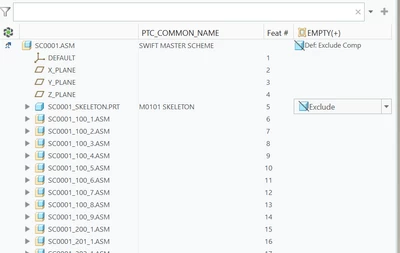
 

Fianna_0-1650355483311.png


Best answer by JCook

Try config option read_parameters_of_excluded.

3 replies

24-Ruby III
April 19, 2022

Hi,

I think Windchill Commonspace must contain requested information.

Fianna11-GarnetAuthor
11-Garnet
April 20, 2022

Hi Martin, 

Can you elaborate? I've got all of those assemblies in my Workspace, and they're in CommonSpace too, but I'm trying to avoid having to load them into memory

24-Ruby III
April 20, 2022

@Fianna wrote:

Hi Martin, 

Can you elaborate? I've got all of those assemblies in my Workspace, and they're in CommonSpace too, but I'm trying to avoid having to load them into memory


Hi,

ask some of your colleagues or your CAD/Windchill admin. I guess you must be able to show PTC_COMMON_NAME column in browser containing CommonSpace contents.

23-Emerald IV
April 20, 2022

'PTC_COMMON_NAME' in Creo is automatically mapped to 'Name' in Windchill.  They both show the same value.

TomU_0-1650456448247.png 

TomU_1-1650456505319.png


The 'Name' column can be seen as a column in the workspace:

TomU_2-1650456612343.png

It is also possible to use these same table views in the Creo 'File -> Open' dialog:

TomU_3-1650456822268.png


Fianna11-GarnetAuthor
11-Garnet
April 20, 2022

Yes, that's how it is for our setup too; I've got Name in commonspace & workspace. 

The question probably isn't clear, I'm trying to see the Name / Common_Name of all of the excluded parts below without having them in session basically: 
This is from inside a creo session rather than wanting to see it in windchill/via a browser.

Fianna_0-1650458064789.png


23-Emerald IV
April 20, 2022

Use PTC_WM_NAME instead:

TomU_0-1650458540462.png

TomU_1-1650458580663.png


JCook7-BedrockAnswer
7-Bedrock
August 17, 2022

Try config option read_parameters_of_excluded.

Fianna11-GarnetAuthor
11-Garnet
August 17, 2022

This is perfect! 
I ended up re-defining the empty rep in the top level assembly to reference a new "empty" rep I also had do define in each of the child assemblies to get it to work, but have set this now and it's working 100% in other assemblies without the need to re-define loads of reps. 

The options are Yes/No/Common_Name_Only so it looks like this was intended to solve just this problem

Thank you 🙂