
10-Marble
November 11, 2021
Solved

Select Previous while in assembly explode mode??
  • November 11, 2021
  • 2 replies
  • 2054 views

UdoMin_0-1636651568670.png

Would creo have the ability to select previous components while in explode rotate mode?

Like in Autocad (copy previous) or (select previous...)???

It drive us nuts to have to reselect huge amounts of parts we use from read only engineer

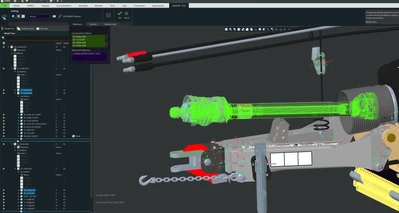
content we import into our tech pub assemblies as simplified reps... As seen above we are rotating this sub assembly and the rotate arrow is buried in the sea of parts. So if we click out of range hunting for our barley visible rotation arrow - our component selection set disappears from time to time creating a user reselect scenario of parts we just had added to our components to move dialog box..

Best answer by kdirth

There is also the option "Move with Children" in the explode tool if you are trying to move a bunch of related items (the main shaft with cover, u-joint, bolts, etc.).

2 replies

kdirth
21-Topaz I
21-Topaz I
November 11, 2021

I don't know of a function like that in Creo.  If you are moving the entire sub assembly, select the sub assembly from the model tree.  You can also use query select (RMB) or use Pick From List to pick different levels.

There is always more to learn.
kdirth
21-Topaz I
kdirth21-Topaz IAnswer
21-Topaz I
November 15, 2021

There is also the option "Move with Children" in the explode tool if you are trying to move a bunch of related items (the main shaft with cover, u-joint, bolts, etc.).

There is always more to learn.
UdoMin10-MarbleAuthor
10-Marble
November 15, 2021

Thanks K Dirth. This works nicely. We sometimes forget about the move w/ children check box. 

tbraxton
22-Sapphire II
22-Sapphire II
November 11, 2021

There is a select by menu last function in the kernel but it can not be accessed through the ribbon or GUI so it is not very useful without some customization. It also selects the last feature not a set of multiple components.


You can use the selection filter "part" in assembly mode to select multiple parts within a pick box.


You can exploit the selection using a map key if you can predefine the selection set. You can make a map key that will make the selection upon execution. This is semi automated as you would likely create a temporary map key for each selection set needed.


You could also create layers that contain sets for selection and select by layer. This would save the pain of manually selecting components each time this happens. Using layer names you can select by layer where the layer contains all of the components relevant to the current workflow.


You may be able to build a search query to make the selection semi automated. This can be saved as a file (.qry) and automated with a map key as well to make the selection as required.

UdoMin10-MarbleAuthor
10-Marble
November 15, 2021

Wow these seem like interesting solutions but by the time we execute

about all those ways to reselect we are already off to the

next model to prep for an spin animation. Wonder if there is something in the explode

code that allows for a simple selection set of previous entities. Think it's worth submitting for an

enhancement request. As you can see the details in our presentations do not have to be ultra precise..