14-Alexandrite
January 31, 2025
Solved

Sheetmetal; Bend 4 walls in one feature

  • January 31, 2025
  • 3 replies
  • 1277 views

Hi Folks,


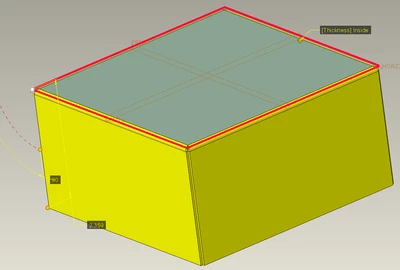
I am using Creo 7.0.8.0. In earlier versions of Creo, I remember being able to bend 4 walls of a simple sheetmetal box in one feature by control-clicking the 4 edges of the first planar feature. I can't seem to do this anymore. When I hold the ctrl key, there is no option to select additional edges. I have to create 4 separate flat-bend features to create a box. Am I missing something here? Thank you.
Best answer by StephenW

I'm on Creo 8, but I suppose its really close to the same.

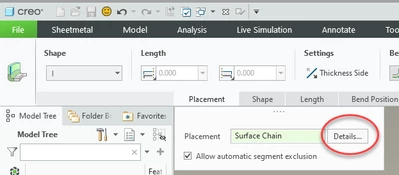
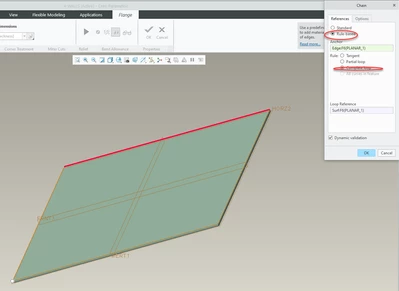
Flange feature, then "details", then select rule based, complete loop, you'll have one of the edges and the surface with all 4 sides


StephenW_0-1738336485197.png


StephenW_1-1738336494454.png


StephenW_3-1738336520994.png


3 replies

tbraxton
22-Sapphire II
22-Sapphire II
January 31, 2025

Is your attempt to make these bends in accordance with the below constraints?


When adding a bend to multiple surfaces, make sure that the surfaces are coplanar and that the driving and offset surfaces match. In addition, the normal directions of the surfaces must be parallel and have the same start and end directions. The surfaces do not need to be adjacent.


A bend cannot cross another bend.

wbottis14-AlexandriteAuthor
14-Alexandrite
January 31, 2025

There is only one surface, so all this criteria is met. I started with one planar surface and I want to make a wall on each edge of that plane to construct a box.

StephenW23-Emerald IIIAnswer
23-Emerald III
January 31, 2025

I'm on Creo 8, but I suppose its really close to the same.

Flange feature, then "details", then select rule based, complete loop, you'll have one of the edges and the surface with all 4 sides


StephenW_0-1738336485197.png


StephenW_1-1738336494454.png


StephenW_3-1738336520994.png


tbraxton
22-Sapphire II
22-Sapphire II
January 31, 2025

The method shown by @StephenW is identical in Creo 7.0.12.0 to bend all four sides in a flange wall.

kdirth
21-Topaz I
21-Topaz I
January 31, 2025

I am using Creo 7.   You have to use Flange and hold Shift to select adjacent edges or a surface to select a loop.

kdirth_0-1738341622532.png


There is always more to learn.
wbottis14-AlexandriteAuthor
14-Alexandrite
January 31, 2025

This method worked as well as Stephen's above. Thank you, kdirth.