
1-Visitor
October 3, 2013
Solved

Show Datum Plane in Drawing View?

  • October 3, 2013
  • 3 replies
  • 15216 views

I can't seem to find a way to show a datum plane in my drawing view. I would like to show the plane and make dimensions to it. I called support about this, but they said it was impossible to show the datum plane, except for when the datum plane view was turned on. I want to select the datum planes I want to show, similar to how you would show a hole axis by clicking on "show model annotations" and selecting the axis you want to show. I can't believe that this isn't possible, it seems like a very simple thing. Can anyone help?


This thread is inactive and closed by the PTC Community Management Team. If you would like to provide a reply and re-open this thread, please notify the moderator and reference the thread. You may also use "Start a topic" button to ask a new question. Please be sure to include what version of the PTC product you are using so another community member knowledgeable about your version may be able to assist.
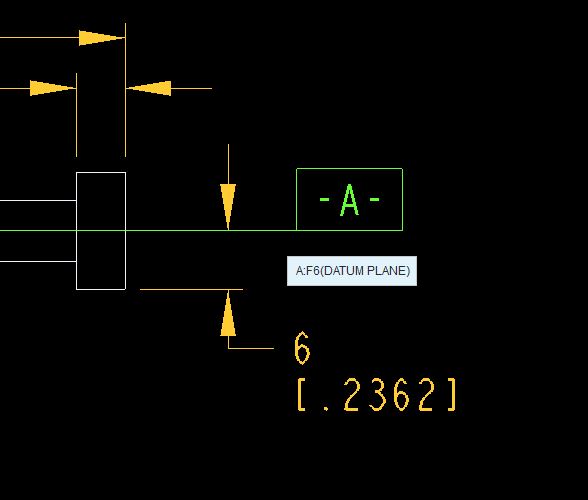
Best answer by Inoram

Is this what you want? Just show planes from the graphic toolbar, right click the plane and hit Properties and change the "A" (or whatever) to the "-A-" .

plane.JPG

3 replies

14-Alexandrite
October 3, 2013

Look at GD&T. I can't look at the moment, I am into something. But I will look in a bit.

1-Visitor
October 3, 2013

You might need to investigate the use of the "Set Datum Tag" Annotation Feature. Alternatively, you can right click on the datum plane and select "Set Datum Tag Annotation" display option.

Rocks11-VisitorAuthor
1-Visitor
October 3, 2013

Scott, I can't seem to find a "set datum tag" option. I tried right clicking the datum in the model and in the drawing and neither of them gave me that option. I also don't see it under Annotate. Can you tell me exactly where it is? Thanks!

Inoram14-AlexandriteAnswer
14-Alexandrite
October 3, 2013

Is this what you want? Just show planes from the graphic toolbar, right click the plane and hit Properties and change the "A" (or whatever) to the "-A-" .

plane.JPG

Rocks11-VisitorAuthor
1-Visitor
October 3, 2013

Finally! Yes Matt that is what I needed! Scott, thank you for the information, I did want it to be a "proper" datum plane I just didn't know how to do it. Thank you!