
cancel
Showing results for 
Search instead for 
Did you mean: 
cancel
Showing results for 
Search instead for 
Did you mean: 

Community Tip - Need help navigating or using the PTC Community? Contact the community team. X

Translate the entire conversation x

Sketcher/ CREO9 / Dimensions whitness line selection priority

MaciejSemeniuk
10-Marble

Sketcher/ CREO9 / Dimensions whitness line selection priority

Hi all 🙂 

in C9, compared to c4 that I'm used to, dimension witness line has selection priority over everything else.
I.E: 
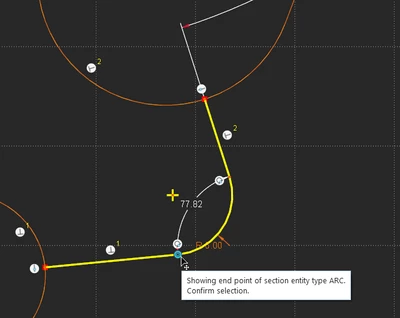
MaciejSemeniuk_1-1761635012242.png


auto - added angular dimension is exactly where the sketched line ends, and when trying to select line endpoint, I have to be aware of not selecting the dimension, if i need to drag the geometry. Else, when I try to drag geometry, but with this blue dot selected it drags the dimension and locks it as user modified.

This is more than disturbing, as the dimensions at random have this "blue dot" drag point exactly where geometry ends, and i did not found a use case for selecting such witness line instead of dragging the dimension text/ value itself.

question is, does config option to erase these dots exist? or to change this priority back to geometry ? so I don't have to mess with selection of the witness lines instead geometry?

Thanks, cheers 🙂 

5 REPLIES 5

Hi @MaciejSemeniuk 

Thank you for your question. 

Your post appears well documented but has not yet received any response. I am replying to raise awareness. Hopefully, another community member will be able to help.

Also, feel free to add any additional information you think might be relevant.


Best regards,


Catalina
PTC Community Moderator
PTC

"question is, does config option to erase these dots exist?"

Erase: No

Display Off: Yes.

Srinivasan_Iyer_0-1762855472210.png


Available under File --> Options

---
Regards
Srinivasan Iyer

already tried that option, but in my case it does not help and still, the first to select is the witness line of the dimension.

MaciejSemeniuk_0-1762928035720.png

MaciejSemeniuk_1-1762928181783.png


Frankly, I am unable to imagine the exact behaviour. However, from the position of the cursor, I assume that you are trying to drag the vertex. Try dragging the geometry if that helps.

---
Regards
Srinivasan Iyer

"try dragging geometry" is exactly what I'm trying to do, and I can, although i need to right- click first to select vertex, not this pesky dimension witness line. 

and what this post is about is to not have to right- click, and select the vortex FIRST and then eventually right click to select witness line. 

Announcements
NEW Creo+ Topics: Real-time Collaboration

Top Tags