1-Visitor
March 22, 2017
Solved

Some dims not displaying correctly

  • March 22, 2017
  • 2 replies
  • 2124 views

Hi All,

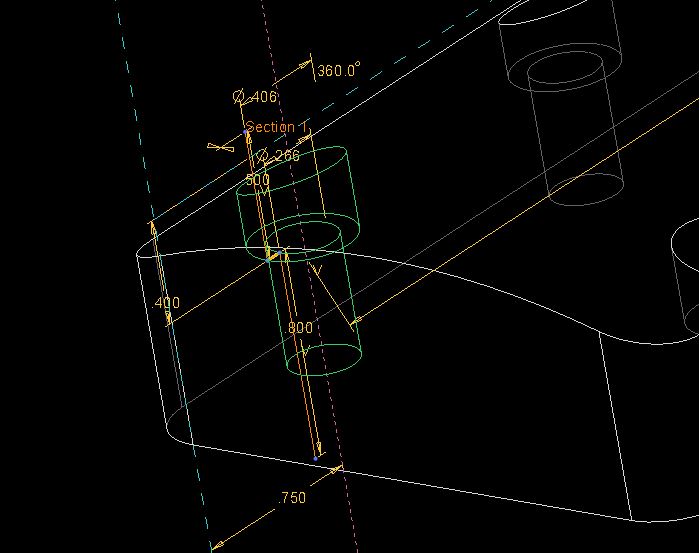
This started happening yesterday in Creo 2.0. See the attached images for reference. The problem is that the dimensions on the first feature of this model are showing up as 0 decimal places. The dim showing as 3 is actually 2.5 and the 1 is actually .875. But, as you can see, the subsequent features are behaving as they should, with 3 decimal places. I've got def_dec_places set to 3. I know that sometimes it's a memory issue, so I restarted Creo, no help. Any ideas on what's causing this?

TIA
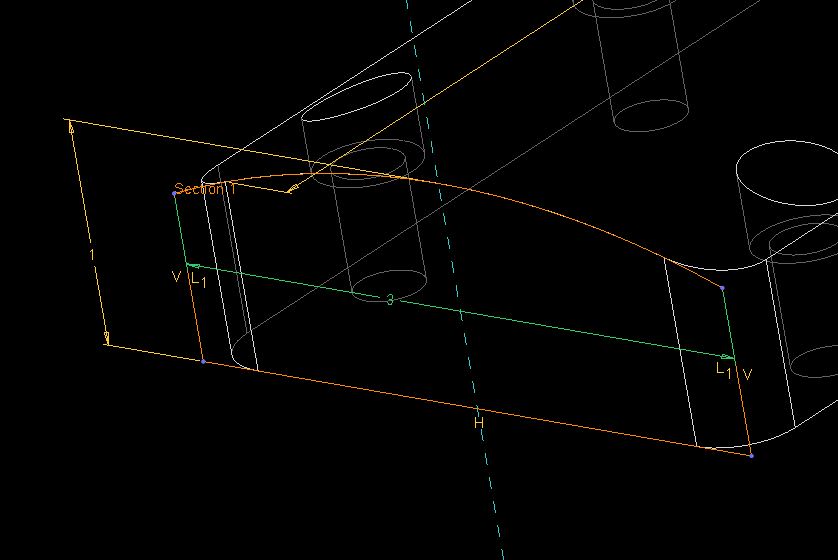
dim1.JPGdim2.JPG

Best answer by MatthewLarsen

Select the offending dimension and RMB on the dimension and go to Properties. 

In the Dimension Properties dialog box, there is also a 'Decimal Places' setting that will effectively override the config setting. 

I've seen this happen in older models where the tolerance was set to 'Limits' so I changed to Nominal but also was able to update the Decimal Places as well. 

2 replies

1-Visitor
March 22, 2017

Select the offending dimension and RMB on the dimension and go to Properties. 

In the Dimension Properties dialog box, there is also a 'Decimal Places' setting that will effectively override the config setting. 

I've seen this happen in older models where the tolerance was set to 'Limits' so I changed to Nominal but also was able to update the Decimal Places as well. 

rmckibben1-VisitorAuthor
1-Visitor
March 22, 2017

Yes, that works. Just wondering how those dimensions would get corrupted like that.

23-Emerald III
March 22, 2017

And UNCHECK the rounded dimension value, if it's checked.

Sometime back, PTC added the round dimension value and made the default action to round the value. It causes havoc on older models.

See config options:

round_displayed_dim_values

round_prewf5_displayed_dim_val

rmckibben1-VisitorAuthor
1-Visitor
March 22, 2017

Right. That wasn't checked, though.