1-Visitor
March 13, 2012
Question

Spinal Bend, loosing model data

  • March 13, 2012
  • 4 replies
  • 8793 views

Hi,

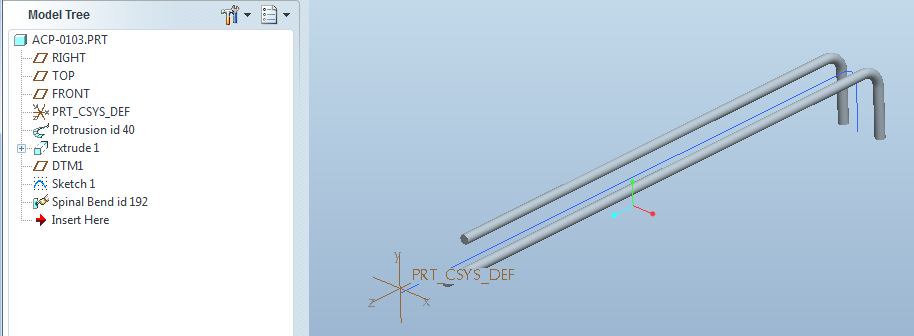
I am trying to bend a solid piece of wire using the spinal bend feature. I have my model drawn flat on the top plane, and need to bend the end down, to accomodate a hanging chain. When I complete the bend I loose the round that keeps my wire form one piece. Any ideas on how to correct?

Before:
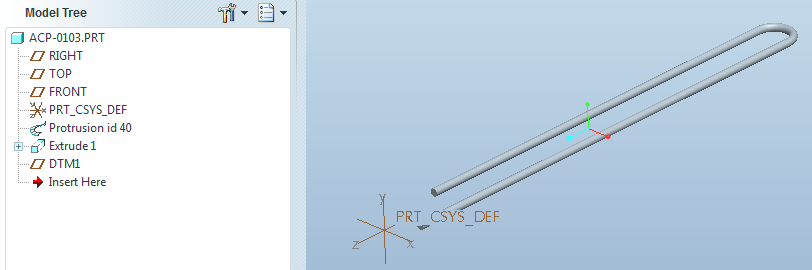
wire form before bend.png

After:

wire form after bend.png

As you can see I loose the radius portion of my piece. Any ideas on what to change to make it work?

I have 4 pieces that I need to do this to, so I am kind of stuck with my design right now.

Thanks for any help.

Matt


This thread is inactive and closed by the PTC Community Management Team. If you would like to provide a reply and re-open this thread, please notify the moderator and reference the thread. You may also use "Start a topic" button to ask a new question. Please be sure to include what version of the PTC product you are using so another community member knowledgeable about your version may be able to assist.

4 replies

Patriot_1776
22-Sapphire II
March 13, 2012

Looks like your spinal bend "spine" curve isn't long enough, and as such the geometry is being cut off where the spine ends. Try making the spine longer than the part.

1-Visitor
March 13, 2012

Thanks Frank, I tried it and the legs of my wire just get longer..??wire form after bend-long.png

Patriot_1776
22-Sapphire II
March 13, 2012

Hmmm, attach the file and maybe I can get a look into it.

Also, I noticed that the start of the spine is not coincident with the end of the rod, so, that might be it also. Without the model it's hard to tell.

Patriot_1776
22-Sapphire II
March 13, 2012

It's been a while since I did one, they're not used often. Here's some things about them that they don't teach you:

1. You are required to define 2 planes whithin which the geometry is to be bent. This distance must be EXACTLY the length of your part, otherwise, you get what happened to you, OR if it's too long, a part with distorted geometry on the loop.

2. You CAN bend greater than 90deg (didn't test the limit), but the example you see in the embedded online help was scanned in from what looks like one of the old books (discontinued long ago in v20 I believe), and it's now WRONG as there is no longer a "tweak" menu.

3. I created a curve to make sure the length I got after the spinal bend equaled the length before the spinal bend. It did, and I didn't see any distortion.

I didn't look at your part, but if you follow what I did in my attached part, you should get yours to work.

Good luck!SPINAL_BEND-01.JPG

Patriot_1776
22-Sapphire II
March 13, 2012

Oh, and just a FYI, your "student edition" parts can't be opened by us regular guys.

1-Visitor
March 14, 2012

Hi Frank,

I tried a couple of other things and still can't get it to bend properly. So what I did was change the length of my scetch curve to just short of the bend and then protrude the feature back on.

Thanks for all the help, can't get it, but my work around will do just fine for what I need. Here is what the final sub-assy looks like.

Matt

catcher with bend legs.png

Patriot_1776
22-Sapphire II
March 14, 2012

Hmmm, PM me the dimensions. I'm using WF4, not Creo, but I could try it in Creo too. Like I said, the 2 planes defining the volume to bend must exactly equal the length of the part (to the tangency of the loop). Did you open the file I attached, or is it incompatible with your student version?

I managed to get this to work, so i'm not sure why your model is having issues:

SPINAL_BEND-01.JPG

1-Visitor
March 14, 2012

I kept messing with it over lunch and got it to work. I was choosing my bend plane, not my end plane. My confusion. So I have it working now and the parts look great.

Thanks again for all the help.spinal bend correct.png