
1-Visitor
October 25, 2013
Question

Standards holes - How to enable thru thread hole with up to surface?

  • October 25, 2013
  • 3 replies
  • 6704 views

Hi,


I'm trying to do a standard hole with ISO standard and I can't use Thru thread with up to surface. Can I change the hole configuration to be able to use this option?


I'm using Pro-engineer Wildfire 5.0.
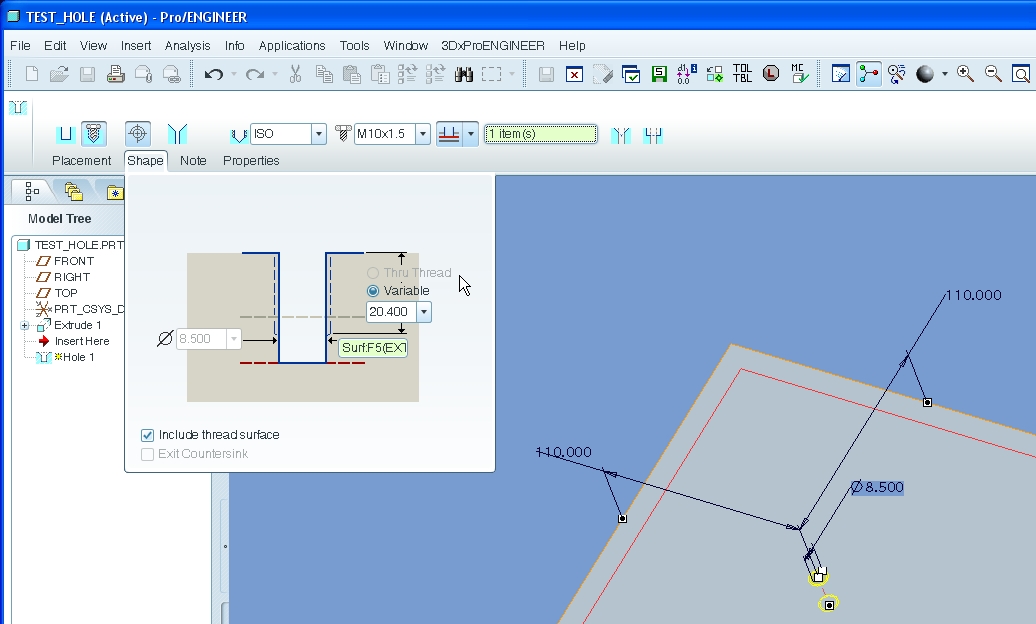
hole-1.jpg

Thanks!

3 replies

14-Alexandrite
October 25, 2013

You can set thru on the drill hole, first.

thruhole.JPG

1-Visitor
October 25, 2013

Thank you Matt, But I can not because on other parts I do not want to go through other surfaces. I want my hole on the first floor only (see picture). I don't want the situation on picture.

hole-2.jpg

14-Alexandrite
October 25, 2013

Ah, ok well you can fake a couple ways, either type in a larger number on the thread depth, or almost the same way make it blind but deeper than the thickness of your plate.

Or put the hole in the model before you extrude the piece over it (probably the more correct way) then it stays parametric if you change you plate thickness later.

Or pick the other surface for direction (flip the hole).

1-Visitor
October 25, 2013

Threads can't go deeper than the hole itself.

You can use feature relation to control thread depth.

feat_rel.JPG

1-Visitor
October 28, 2013

Thanks for your good idea, but I don't want to trick anything. I prefer make the good configuration in the standard table of pro-e.

Did anyone know how to unlock option?

1-Visitor
October 28, 2013

Ok, well, relations can get tricky.

What option do you want to unlock?

Dale_Rosema
23-Emerald III
23-Emerald III
October 28, 2013

That was the premise of the question with which this began.

"Can I change the hole configuration to be able to use this option?"

I am not sure there is a configuration that is currently available to be unlocked to do this.