
12-Amethyst
July 25, 2023
Solved

Symbol name in the drawing tree

  • July 25, 2023
  • 2 replies
  • 2507 views

Hi all,


In CREO 7.0.2.0 or in CREO 8.0.5.0, we want to see the symbol name in the drawing tree.

In the following pic, you can see:


1 - the Symbol

2 - the symbol name

3 - the drawing tree (Creo 8 version)
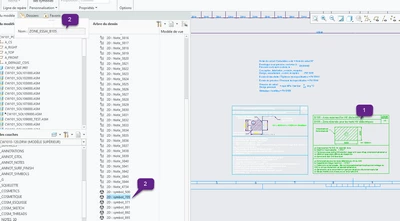
 

Dom_BOUCHARDY_0-1690291657582.png


I think the symbol name is saved somewhere, and I think it should be possible to extract it in order to make it appear in the drawing tree. I thought it was possible to save the drawing tree as drwtreetool.txt, but I couldn't find the file.


Could you help me to find the txt file, and how to view the symbol name in the drawing tree?

Regards

Best answer by kdirth

At this time, I believed your only option is to manually rename the symbol.


If they do make a change to use the symbol name in the model tree, I would expect it to have a number appended to it to allow for multiple instances to be used (name_1, name_2, name_3....).

2 replies

23-Emerald III
July 25, 2023

I do not think this is possible at this time. Same for table names, which I have asked for.

The system knows the information, but the programmers have not written the code to be useful in putting that information into the drawing tree.

12-Amethyst
August 17, 2023

Hi,


Thanks.

Maybe in a future release?

Regards

kdirth
21-Topaz I
kdirth21-Topaz IAnswer
21-Topaz I
July 25, 2023

At this time, I believed your only option is to manually rename the symbol.


If they do make a change to use the symbol name in the model tree, I would expect it to have a number appended to it to allow for multiple instances to be used (name_1, name_2, name_3....).

There is always more to learn.
12-Amethyst
August 17, 2023

Hi,


Thanks for the workaround.
It's not very satisfying, but we'll deal with it 🙂


Regards