Solved
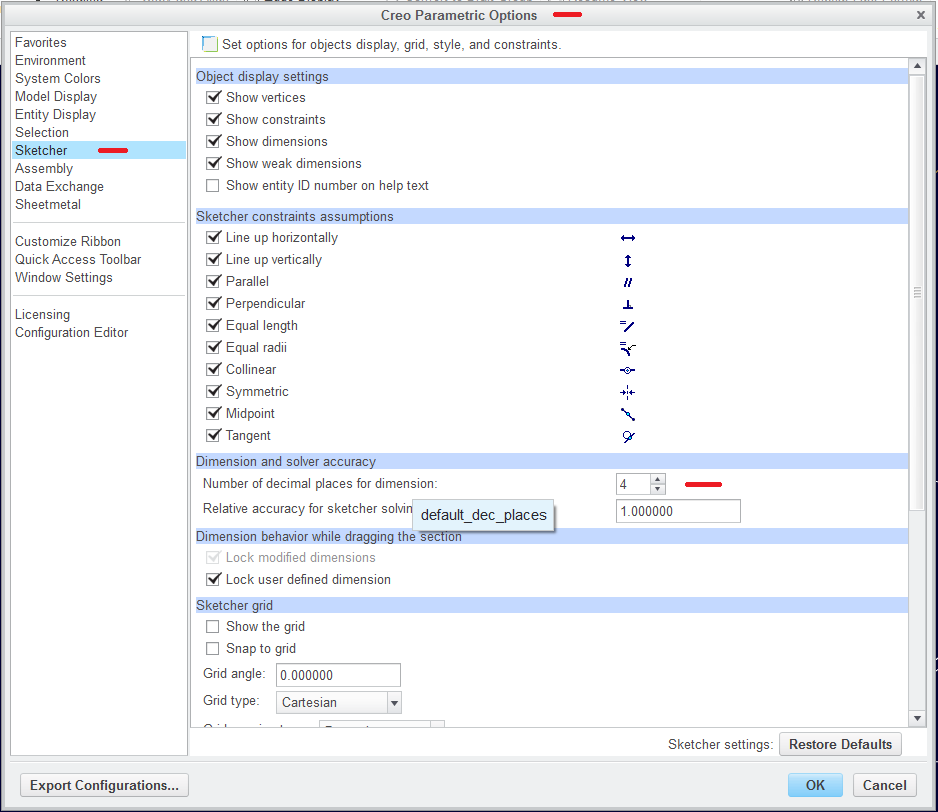
Try changing Num Digits under Sec Environ.
Working in Creo 2.0 Sheet Metal and I'm trying to add a dimension and I'm getting the following message "Could not add selected dimension. Try changing Num Digits under Sec Environ."
How do you change the Num Digits under Sec Environ? I've searched here and the interweb and the only thing I found is somebody asking this same question back in 2008 on another forum but it was never answered.
Thanks...........
This thread is inactive and closed by the PTC Community Management Team. If you would like to provide a reply and re-open this thread, please notify the moderator and reference the thread. You may also use "Start a topic" button to ask a new question. Please be sure to include what version of the PTC product you are using so another community member knowledgeable about your version may be able to assist.