
21-Topaz II
February 9, 2023
Question

Unable to create a "proper" offset of curves

  • February 9, 2023
  • 3 replies
  • 6955 views

I'm wondering if this is a bug in Creo (I'm using 9.0.1.0), or if I have mistakenly set a stupid settings...


I can't seem to create offset curves in the manner that I've been for decades. What I consider standard process to make an offset is:

(1) Select a chain of curves, either one by one or with the chain selection (shift-select).

(2) When I'm done selecting curves, an arrow shows me the direction of the offset.

(3) I enter a value and I now have a chain of offset curves, comprised of individual curves corresponding to each of the curves I selected in step (1)

What I'm seeing this afternoon is what's shown in the image. I can kind of pick a chain, but the offset curve it creates is a single curve, no matter how many entities are used, and I can't access individual entities in the curve (i.e. delete an unneeded curve in the chain so it can be replaced, or trim a curve with another entity, etc.).

Is there a setting I inadvertantly toggled that activates this type of behavior? I wasn't seeing this in the morning, but now I'm doomed.
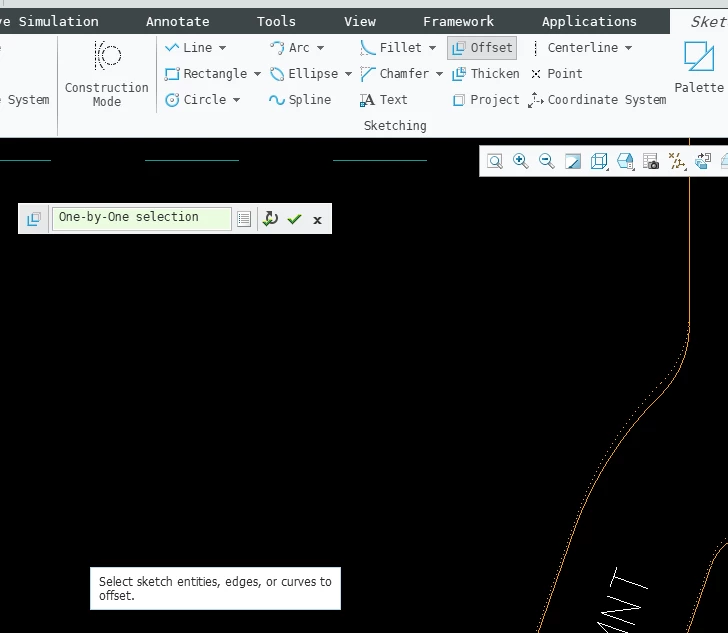
Incorrect Selection MethodIncorrect Selection Method


3 replies

24-Ruby III
February 10, 2023

Hi,

in Creo 9.0.2.0 there is inconvenient solution. Unfortunately, I'm not an expert, I just know that PTC changed the Offset feature significantly in Creo 9.0


After clicking Offset command, following small window appears.

MartinHanak_0-1676024573430.png

After selecting single sketched entity the windows appearance changes.

MartinHanak_1-1676024639790.png

After setting offset value you can click MartinHanak_2-1676024691491.png to finish offset creation.

Then you can repeat the above process for other sketched entites.


KenFarley21-Topaz IIAuthor
21-Topaz II
February 10, 2023

Hi Martin.

Yeah, the interface you are pointing out is the one I am having such trouble with. What I expect is what I see if I am working on an internal sketch for a feature. That operation popup window that looks like this:

Offset Function Wanted.png

Where I first select the start curve of the chain, then shift-select the end curve, and am shown an offset direction and asked for a distance. When this offset is created, the individuality of all the curves selected is respected, so I get the same number of curves in the offset section as I have in the "source" geometry.

The new interface is, in my opinion, a horror show. It creates a single curve as the offset, so instead of a nice set of lines and arcs that I started with, I have a useless conjoined snake that I can't use for the further geometry creation I need to do. What I'm forced to do to get around this dehancement is painstakingly create all the offset curves I need one at a time, carefully trimming them in order to obtain the desired effect.

What's haunting me is I could swear I just did this kind of thing yesterday morning, but maybe that was in the aforementioned internal feature sketch (for a blend)? I don't know. I just know I'm not happy with this.

Hoping that someone has a means of setting an option or manipulating the conjoined offset curve to get what I want, otherwise I'm going to have to endure the massive slowdown this nonsense creates for me.


Patriot_1776
22-Sapphire II
February 10, 2023

'Sup Ken!  I'm on Creo 8 so I can't test it, but what "kinda" looks like is happening is that the offset becomes a spline.  In playing around with converting chains of entities in sketcher, it's clear that when it creates a spline in sketcher things get weird, and the geometry actually changes.  Unlike when you make a polyline in AutoCAD where it simple links the entities together without changing them.


It's obvious the code-jockey's at PTC don't use the software and then they make these GUI and other "Enhancements!!!" so they can claim they added more features.  Pro tip:  Moving things around and making more completely indecipherable icons (which I can't even read) is NOT progress, and in fact is REGRESS since now we have to waste thousands of man-hours learning where you moved the same commands we were used to seeing elsewhere instead of actually doing our jobs.  Worse, they don't even seem to understand geometry or how the software even actually works.  But hey, we get "Bold New Graphics!!!" (motorcyclists term) every revision...


At work here we're going to have to SERIOUSLY take a look at this issue, because the accuracy of splines and their offsets are absolutely core to what we do, and THE reason we picked Pro/E over the competitors at the time.  If they're gone and FUBAR'd that, then we'll have to evaluate whether we keep using Creo or not, and lets just say we're a very large customer...


Best of luck getting your issue sorted out!

KenFarley21-Topaz IIAuthor
21-Topaz II
February 10, 2023

Hey there, FS (under your secret identity). I actually thought of the term "dehancement" and found that it is particularly applicable here.

And yeah, converting to splines is inherently terrible at maintaining tangencies and curvature. It was the cause of a fiasco I had when we were having a custom gear made. Mirroring one half of a gear tooth in the sketcher causes, if you subsequently tweak your model, non-identical geometry. And if the geometry "should" be simple lines and arcs, a spline is a terrible idea. You'll pretty much always get an odd transition from the "arc" parts into the "straight" parts.

Alas, I've used enough tricks in the trade to figure out a workaround, but that doesn't mean I have to like it. Takes much much more time to do what was a simple "pick-pick-okay-enter value" operation.

Patriot_1776
22-Sapphire II
February 10, 2023

LOL  Not so secret I guess?  Not my doing, but for some stupid reason, me and a few others here have their names randomly and automatically change to some stupid "AB###" without warning.  You can change it back, but it still keeps happening.  Very annoying.  I've complained any number of times and they can't seem to fix it.  So, I'm having fun coming up with a new name every time it changes....although as I recall someone got pretty upset with one of my recent names (when I got tired of being ignored) and reported it.🤣  "DEhancemen", I like it, VERY fitting.  I don't consider a ton more forced clicks and selections an "enhancement".  I miss the days when the code-jockeys actually seemed to use and understand the software.  Want a REAL enhancement?  Quit splitting surfaces and curves that SHOULD be contimuous (like they are in EVERY other CAD software) into multiple pieces.....but I digress...


Yeah, I've had to forward this issue to our Admins to look into it, because the accuracy of splines is crucial to the most important thing we do, and this kind of absurdity could be a huge problem.  Even if there's a Pro/WORKAROUND for it it would still be FAR too easy for a guy to forget that one crucial step (or a new guy making that mistake) and cost us, literally, MILLIONS of dollars in scrap.  Not good.


But hey, that new little "Bold New Graphics!!!" pop-up menu IS kinda cute!🤣  And for reference to the non-motorcyclists here, "Bold New Graphics"  is a derogatory term for when a motorcycle comes out in a new year with ZERO functional, electrical, or mechanical changes, but simply has a new paint scheme and the Marketeers claim in all the literature that it's been significantly enhanced...


Best of luck with all this, hope you find a better way before you wear out the Pro/FANITY module... LOL


1-Visitor
May 9, 2024

This is still a major issue. It is, as someone put it, a de-hancement. This is an incredibly bad change. I can't stress how slowing this is for workflow. Super frustrating.

Trying to trim curves is no longer possible as it is a composite curve.

PTC, can you change this back to the workflow/functionality of the previous 20+ years?


Anyone out there figured out a reasonable workaround?


Thanks...

1-Visitor
May 9, 2024

Calls me a newbie - I've been cranking proE for 30+ years....