12-Amethyst
March 9, 2023
Solved

Upper-level assembly name on repeat region

  • March 9, 2023
  • 3 replies
  • 10236 views

Hello!

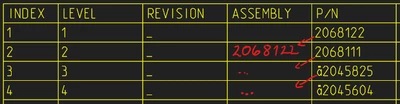
To create a report for Fire Certificate Inventory List (EN 45545) I want to use a repeat region of my top-level assembly.

For every part, I need to report the assembly where it is mounted.

Is there any option to report the Part Number (or any other parameter) of the immediate upper level?

I hope the picture below can explain this case better.

VR_9713318_0-1678392151862.png

Thanks!


Best answer by RPN

I did it with a Repeat Relation.


As far I see PTC will do a Depth-first search. And this is only one solution I guess..


You must have rpt.level and asm.mbr.name in your repeat region, else you don't have access to the corresponding vars.

The relation will be evaluated not recursively in Creo with a new stack, so the var values will be keept during this while/for Loop.


In Level 1 your Parent is empty "" and you save the name in lev1.

In Level 2 your Parent is lev1 and you save in lev2 the name

In Level 3 your Parent is lev2 and you save in lev3 the name

... and so on


You must have this for the amount of levels you expect.


PARENT is a Repeat Relation Var -> rpt.rel.parent, and must be added.

 

ParentMemberDisplay.png


Here this example stops at Level 4, Level > 4 will set a static text, to force a relation edit.

I kept the relation easy to maintain, no "else" 


if rpt_level == 1
 parent=""
 lev1=asm_mbr_name
endif

if rpt_level == 2
 parent= lev1
 lev2=asm_mbr_name
endif

if rpt_level == 3
 parent= lev2
 lev3 =asm_mbr_name
endif

if rpt_level == 4
 parent= lev3
 lev4 =asm_mbr_name
endif

if rpt_level > 4
 parent= "Please Extend Relation"
endif


Vars Init

Here you will  only initialize a var if not already exists.


if !exists ("lev1")
lev1=""
endif


You can prepend this, for each level, to be sure each level has a value.

But PTC will walk from 1 to 2 to 3 to ...

This may not needed.


The example table is attached.

3 replies

KenFarley
21-Topaz II
March 9, 2023

To do this kind of thing with normal parts, I use a parameter in each part/assembly that is something like "partnoASM". In each assembly, I use relations to set this parameter for any components needing it, using the parameter that specifies the "partnumber" for the assembly.

Once I've done that, I can use the parameter in tables/notes.

A couple of difficulties you will have to consider:

(1) A part/assembly can be used in more than one upper level assembly. What do you do then?

(2) If a part/assembly doesn't have the "partnoASM" set, what do you want to have shown?


By and large, parts/assemblies do not have any sort of information stored in them that indicates what assemblies they are being used in. There is no way to query a part and show the "next level". Thus, I believe the only way to (possibly) implement what you want is via some sort of custom method like the one I loosely suggest.

12-Amethyst
March 10, 2023

Hello, Ken.

Yes, often a P/N is used in more than one assembly, which makes not possible to use your suggestion. Sadly.

Thanks for your contribution.


24-Ruby III
March 10, 2023

@VR_9713318 wrote:

Hello, Ken.

Yes, often a P/N is used in more than one assembly, which makes not possible to use your suggestion. Sadly.

Thanks for your contribution.


Hi,

I think you can create component parameters instead of part parameters.

24-Ruby III
March 10, 2023

Hi,

FYI ... described functionality is not available OOTB.

Possible solution: Export table into csv file, import it into Excel and add requested information manually.

12-Amethyst
March 10, 2023

Hello, Martin.

Reading your and Ken's answer, I understood that I'll have to export the list without this column and create a macro inside Excel to organize these numbers.

Thanks!

12-Amethyst
March 10, 2023

Hey.

It was easier than I thought.

I used this formula on column D (ASSEMBLY)

=LOOKUP(2;1/($B$2:B4=(B4-1));$E$2:E4)

Note that I use ";" as separator. Correct to "," if needed.


RPN
18-Opal
March 14, 2023

Do you need that for the first level only?

Do you want to include the top level item as well?

12-Amethyst
March 14, 2023

Hello.

For every component, show me the parent, or in more practical terms, show me where each part it is used inside this product.

RPN
RPN18-OpalAnswer
18-Opal
March 15, 2023

I did it with a Repeat Relation.


As far I see PTC will do a Depth-first search. And this is only one solution I guess..


You must have rpt.level and asm.mbr.name in your repeat region, else you don't have access to the corresponding vars.

The relation will be evaluated not recursively in Creo with a new stack, so the var values will be keept during this while/for Loop.


In Level 1 your Parent is empty "" and you save the name in lev1.

In Level 2 your Parent is lev1 and you save in lev2 the name

In Level 3 your Parent is lev2 and you save in lev3 the name

... and so on


You must have this for the amount of levels you expect.


PARENT is a Repeat Relation Var -> rpt.rel.parent, and must be added.


ParentMemberDisplay.png


Here this example stops at Level 4, Level > 4 will set a static text, to force a relation edit.

I kept the relation easy to maintain, no "else" 


if rpt_level == 1
 parent=""
 lev1=asm_mbr_name
endif

if rpt_level == 2
 parent= lev1
 lev2=asm_mbr_name
endif

if rpt_level == 3
 parent= lev2
 lev3 =asm_mbr_name
endif

if rpt_level == 4
 parent= lev3
 lev4 =asm_mbr_name
endif

if rpt_level > 4
 parent= "Please Extend Relation"
endif


Vars Init

Here you will  only initialize a var if not already exists.


if !exists ("lev1")
lev1=""
endif


You can prepend this, for each level, to be sure each level has a value.

But PTC will walk from 1 to 2 to 3 to ...

This may not needed.


The example table is attached.