3-Newcomer
September 8, 2022
Solved

Using Repeat Region's to Document File History.

  • September 8, 2022
  • 3 replies
  • 1443 views

Hello, fellow CAD enthusiasts!

I recently started working as a CAD Administrator (if two months ago counts as recent). They hired me for my Reliable work ethic, and my can do attitude, and not (I repeat, NOT) for my skills within Creo.


And so I've come to you all in a great time of need. Here's what I'm hoping to do:


Using Tables within a drawing, I want to find a way to automatically display what .prt the active model was copied from (if any). I'm doing this as a special request from our machine shop, who confided in me that every time they have to create one of our engineered parts for the first time, they end up having to reconstruct all of their tooling code, which wastes so, so much time!


So what do you say? would you happen to know a thing or two about how we could make this happen?

Thank you everyone.
Best answer by TomU

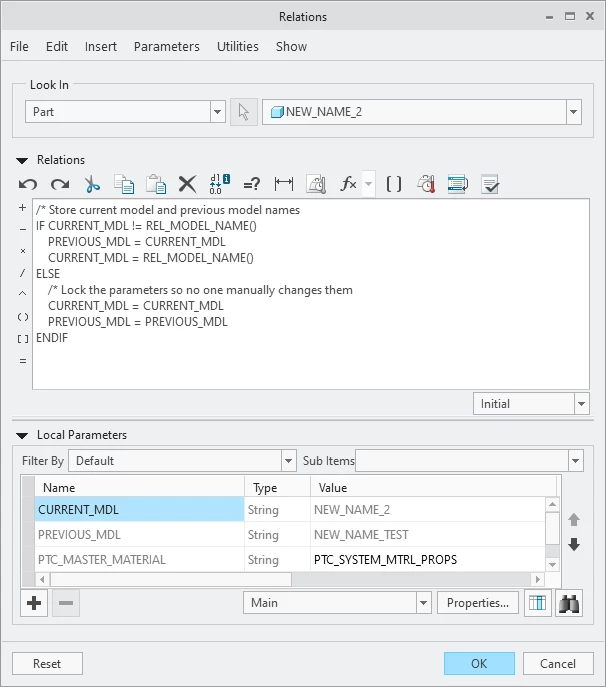
Relations example.  A regeneration is required after the 'Save As' in order to update the parameter values.


TomU_0-1662691701070.png


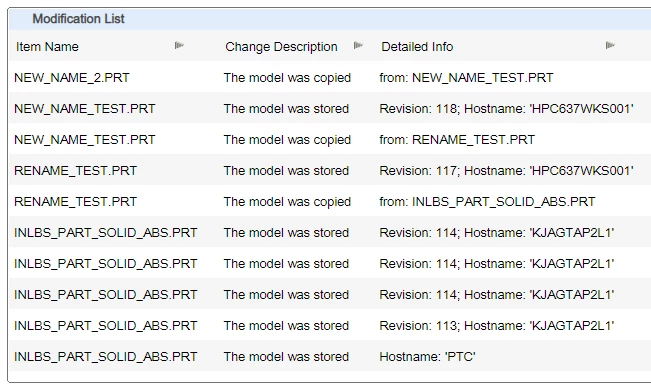
Here's what the file history shows:  (Tools -> Investigate -> File History)


TomU_1-1662691796618.png


The PREVIOUS_MDL parameter (from the model) could then be displayed on the drawing:


TomU_2-1662691964090.png


3 replies

23-Emerald IV
September 9, 2022

Welcome!  Unfortunately this capability is not available 'out of the box'.  While a part does store it's history internally, this information is not exposed in any way that can be read by the drawing.  It might be possible to access this internal information with certain programming tools (C++, Java, etc.), but that is probably way beyond what you're ready to tackle.


If you can modify your Creo start parts, you may be able to create part level relations that will store the previous model and and then expose this as a parameter that could be displayed on the drawing.  Unfortunately this will only work for new models created after this was added (unless these same relations are added to other existing models.)

TomU23-Emerald IVAnswer
23-Emerald IV
September 9, 2022

Relations example.  A regeneration is required after the 'Save As' in order to update the parameter values.


TomU_0-1662691701070.png


Here's what the file history shows:  (Tools -> Investigate -> File History)


TomU_1-1662691796618.png


The PREVIOUS_MDL parameter (from the model) could then be displayed on the drawing:


TomU_2-1662691964090.png


23-Emerald III
September 9, 2022

While you did not mention it, if you are using a PDM system like Windchill, you can also copy a file in Windchill and Creo would have NO idea of the prior naming because it was done outside of Creo.

23-Emerald IV
September 9, 2022

If the relations already exist in the model, then it would actually.  As long as CURRENT_MDL was already populated, any future change to the name would be caught the next time the model is opened in Creo and regenerated (regardless of whether that change occurred in Windchill or Creo.)  Granted, if there were multiple successive save-as (or renames) events in Windchill without ever opening the model, then it wouldn't have any record of the intermediate steps, it would only see the last one.

19-Tanzanite
September 9, 2022

I'd say you should add a parameter to your start-parts called "DERIVED_FROM_MODEL" and ask your design engineers to fill out this information, so as to help out the folks in the machine shop (I assume they want this so they can "reuse" their CAM programs?)