
8-Gravel
October 4, 2023
Solved

Warping a curve in a cylindrical surface

  • October 4, 2023
  • 5 replies
  • 5738 views

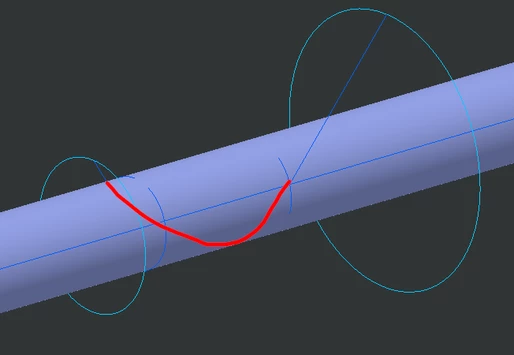
Hi everyone! I'm trying to model a cable that is warping in a cylinder. Practically I have 2 discs with different diameters with cables connected to each side of the disc.  When I start rotating the discs, the cable will start warping to the cylinder (without the cylinder in the middle they will all converge to a point). I was able to construct a model where I have the 2 cables tangent to the cylinder, but now I'm having troubles to design the curve wrapped into the cylindrical surface. When I try to connect the two segments, I can't place the curve on the surface, since Creo is making me select just half of that. 

Is there any way I can place a curve on a cylindrical surface for more than 180°?
 

2023-10-04 16_35_37-Window.png

Best answer by KenFarley

I kind of have an idea of what you are after, it's just not clear what the boundary conditions of the cable are at each of your discs. Are the ends normal to the discs, or tangent, or some other condition?

When I've had to model complicated wire geometries like this I break the problem up into a sequence of tangent connected curves. For a complicated situation like this I would probably use a Curve from Equation, in polar coordinates, to do the fancy spiral portion of the thing. To match tangencies I've used the evalGraph function to define a nice smooth transition from one end of the curve to the next. It's a bit of work but it give superb geometry without discontinuities that result from using shortcuts to define things.


5 replies

tbraxton
22-Sapphire II
22-Sapphire II
October 4, 2023

Creo always represents circles and cylinders split in half. You will need to select both halves of the cylinder surface during selection. If you select the cylinder surface quilt it should include both halves. Use the selection filter to set to quilt to do this. You can also use the CTRL key to manually select both halves.


You may want to use a helical sweep to create a surface that would bisect one cable when wrapped around the axis. You can then intersect the helical surface with the cylinder surface to get curves on the cylinder.

To Create a Helical Sweep (ptc.com)

G.Bones8-GravelAuthor
8-Gravel
October 6, 2023

With the first solution, Creo is taking the shortest path to create the curve, so I have to find a way to give it the middle point of the curve and it's direction, which is not easy.


For the helical sweep: how can I create the sweep already tangent to my curve? 

tbraxton
22-Sapphire II
22-Sapphire II
October 6, 2023

Perhaps my assumptions about the desired geometry are not accurate. Can you post an image of what the wound cable looks like after assembly? A picture of the winding in process would be helpful as well.


If you have a model with a feature(s), you are stuck on post more details along with the model.


KenFarley21-Topaz IIAnswer
21-Topaz II
October 6, 2023

I kind of have an idea of what you are after, it's just not clear what the boundary conditions of the cable are at each of your discs. Are the ends normal to the discs, or tangent, or some other condition?

When I've had to model complicated wire geometries like this I break the problem up into a sequence of tangent connected curves. For a complicated situation like this I would probably use a Curve from Equation, in polar coordinates, to do the fancy spiral portion of the thing. To match tangencies I've used the evalGraph function to define a nice smooth transition from one end of the curve to the next. It's a bit of work but it give superb geometry without discontinuities that result from using shortcuts to define things.


G.Bones8-GravelAuthor
8-Gravel
October 9, 2023

Yes, maybe I wasn't really clear with the inputs (and so the parameters): 

  • Distance between the two discs.
  • Cylinder diameter.
  • Winding angle: the angle between the 2 cable on a plane normal to the cylinder diameter.

I've now tried to combine two quilts, one extruded in the direction normal to cylinder axis, the other normal to a plane passing through the cylinder axis. The result look very good. Now the problem will be thicken the geometry.


To reply to @tbraxton there a tube sliding inside a series of bands wrapped on the cylinder and tensioned, This work like a suspension, because the tube should avoid any vibration. This model will be useful for me to decide the length of the bands prior to produce them, instead of producing different set and try the best lenght. 


2023-10-09 07_54_35-Window.png

I'm afraid this is not the best solution, because if I analyze the curvature of the curve wrapped on cylinder, this is constant.

2023-10-09 08_01_37-Window.png

15-Moonstone
October 10, 2023

Guessing what you're after here, but try this:

  1. Make a Curve Through Points.
  2. Go from the end of one curve to the end of the other curve.
  3. In the Placement tab, check the "Place curve on surface" option and select the surface. For this to work, both your points must be on the surface itself.
  4. In the Ends Condition tab, set both to Tangent to the curve ends you're trying to align it to. For this to work, those curve ends must be tangent to the surface you're placing the curve on.


Pettersson_1-1696933430468.png


Here's the result with the curves up to the circles also tangent, which might not be what you want, but I thought it looked neater. 😄

Pettersson_2-1696933777525.png


G.Bones8-GravelAuthor
8-Gravel
October 10, 2023

This is what I'm trying to do, but how do you wrap the line following the path passing under the cylinder? When I try to do the curve it's like this:

2023-10-10 14_51_26-AC12748 Rev_ 01.5+ In Work (Active) wtws___PLM_Workspace on Operations_ac12748..png

While it should pass all around the cylinder, like an helix.

15-Moonstone
October 10, 2023

Ah, ok. Yeah, it's going to take the shortest route. Try adding another point in the middle to help guide the curve along. You can add as many points as you want, as long as they are all on the surface.

Pettersson_0-1696943337614.png


kdirth
21-Topaz I
21-Topaz I
October 10, 2023

Here is my attempt to accomplish what I think you are trying to do.  Using some setup relations, a sketch and measurements, I was able to let Creo do the work and create a curve with a constant angle from a point. around a cylinder and to another point.  Creo 7 model attached.

kdirth_0-1696963260618.png


There is always more to learn.
19-Tanzanite
October 11, 2023

Here's my attempt - using the wrap feature.

pausob_0-1697020486661.png