
1-Visitor
July 12, 2016
Question

What happend to draft analysis - BOTH SIDES?

  • July 12, 2016
  • 5 replies
  • 6225 views

Straight draft in my crude example picture, but I put the "direction" (representing the parting line) in the middle, so when I would normally pick the "both directions" button, and I'd see negative draft colors on one side.


Creo 3 M090 does not have a "both direction" button, and until I can find it or the like Creo is not providing accurate draft analysis.


I've been using draft analysis in Pro for nearly 20 years. What am I missing today?
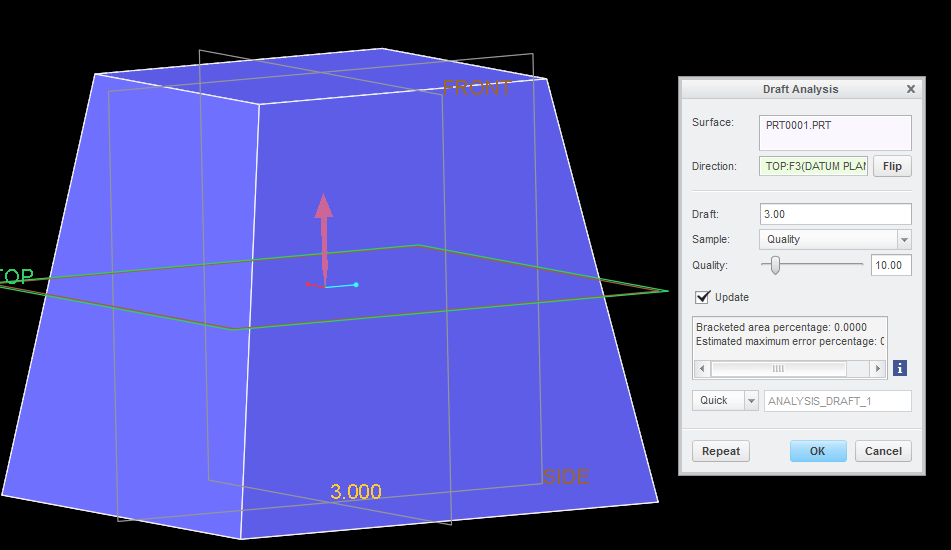

draft both sides.png


This thread is inactive and closed by the PTC Community Management Team. If you would like to provide a reply and re-open this thread, please notify the moderator and reference the thread. You may also use "Start a topic" button to ask a new question. Please be sure to include what version of the PTC product you are using so another community member knowledgeable about your version may be able to assist.

5 replies

1-Visitor
July 12, 2016

Creo happened. The new analysis tools Baaaaalllow!

I have not used 3 but you may want to look at the fly-out within the Draft Analysis fly-out after it appears and see if two sided was added back to the options.

emetzger1-VisitorAuthor
1-Visitor
July 12, 2016

This was BOTH SIDES option.

PTC - Where is this now?

Pre-Creo Both Sides.JPG

21-Topaz II
July 12, 2016

I believe that it does both directions by default.  What are you expecting to see that you are not?  Your image looks right to me.  Everything in purple/blue is at least 3 degrees positive draft.

emetzger1-VisitorAuthor
1-Visitor
July 12, 2016

Both sides...when the highlighted top plane is selected...would highlight a natural split and change color at that selected plane. Right now, it shows a straight pull via the direction of the datum plane but without being able to pick "Both Sides" it does not show what would be the split at both sides and identify where I have negative draft.

emetzger1-VisitorAuthor
1-Visitor
July 13, 2016

Draft the entire side wall and try that again using the same top (middle) datum as the direction/parting line! You'll then see what I am referring to when you hit both directions.

I got my consultant involved as well, as I wanted to know when and why this was removed. Signed point to the functionality being moved to the Cast/Mold extension, but this is not yet confirmed with our own eyes.

emetzger1-VisitorAuthor
1-Visitor
July 12, 2016

Direct from PTC;  "...this "both sides" option has been made obsolete."

23-Emerald IV
July 13, 2016

It looks like this actually happened back in Wildfire 5.  See the last comment from this discussion here: RE: Draft check in Creo Wildfire 5, what happend?

1-Visitor
July 13, 2016

Works just fine in WF5/Creo Parametric...