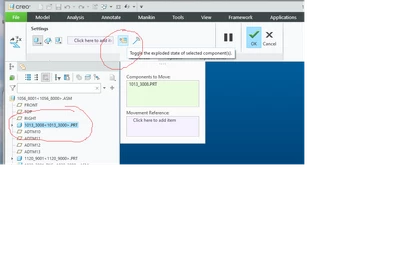
Where is the Explode > Reset Component Position Function?
Previous functionality had a "Reset Component Position" (I don't remember the exact menus) which allowed you to reset the explode position of one component. It put the component back to the unexploded position without changing its explode state.
I just assembled a small component into a Creo 9 assembly, which, in the exploded view is off into space somewhere. Of course, that destroys drawing views, detail views, etc..
I have run into this many times in the past. PTC tech support is useless on the subject. Often I just have to create a new explode state to make it work right - without a bunch of useless moves which mess up explode lines and require a ton of work on the drawings. This all seems so ridiculous. Where did it go?
Does anyone know where PTC has buried this very useful functionality? The UI fails the intuitive test, for both me and PTC tech support. PTC support documents are useless as usual.
This document says "Reset" but I don't see the menu. The only hint I have is the r11 in the URL, which might mean they failed to include the function in 9? https://support.ptc.com/help/creo/creo_pma/r11.0/usascii/index.html#page/detail/To_Create_an_Exploded_View.html Of course they don't say what Creo version the document applies to, or if this references previous versions before they took the function out. Nor does the page say anything more about what it says is a "Reset" menu item.
Is anyone familiar with this function and where it is hidden? Perhaps I am blind, but I can't find it.