3-Newcomer
August 21, 2024
Solved

bad representation of sections in 2d drawing

  • August 21, 2024
  • 4 replies
  • 5104 views

good morning

I have a problem in my Creo version 7
when I create sections in the presence of imported objects the sections show lines that should not appear


I need to work with objects imported from Step and Iges of a fair amount of complexity. Therefore I cannot fix the errors and I let broken solids and surfaces be created.

In the images that I post below the view from 3d is shown in "no hidden" view and the section of the 2d model, as you can see the section shows the objects as if they were in "wireframe" view


In the definition of the "view display" view it is marked "no Hidden" and it is actually like this for all the solids of the drawing that I created, but not for the imported objects

In the definition of the "section" view by selecting model edge visibility>area the section correctly shows only the sectioned volumes


I definitely need to solve this problem because in some sections it is not possible for me to work


correct view in 3d section
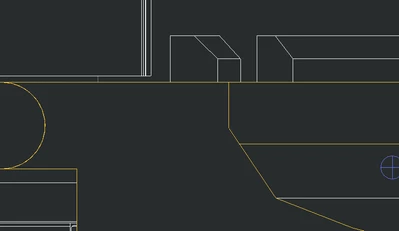
3d section.png


bad view in 2d section

2d section.png

thanks for reading.


post edit

select "include quilts" in the definition of the section remove all the quilts, and that is bad because remove also object that I want to keep
Best answer by StephenW

Because it's purple in the drawing, i can tell it's a surface model (quilts)

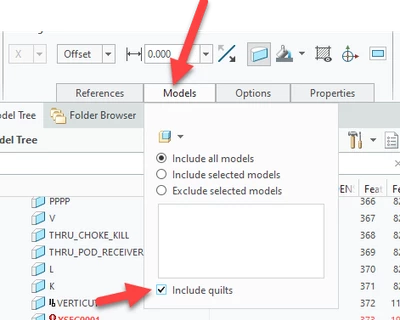
Go back to the model, edit the section view, under the Model tab, click the "include quilts" button

Then in the drawing view, edit the view properties, under the view display tab, click the "HLR for quilts"


StephenW_0-1724250449431.png


4 replies

StephenW23-Emerald IIIAnswer
23-Emerald III
August 21, 2024

Because it's purple in the drawing, i can tell it's a surface model (quilts)

Go back to the model, edit the section view, under the Model tab, click the "include quilts" button

Then in the drawing view, edit the view properties, under the view display tab, click the "HLR for quilts"


StephenW_0-1724250449431.png


D'Amato_A3-NewcomerAuthor
3-Newcomer
August 21, 2024

thanks for the reply
i did. it does indeed remove the purple lines. however it works too well: it also removes the surfaces of the objects that have not been sectioned. effectively removing half of my objects from view.
which makes my section as useless as before

is there no way to discriminate which components to preserve?
include and exclude components in the section definition does not work

23-Emerald III
August 21, 2024

Your x-section should cut thru the solids and surfaces at the location you set. Likely you are expecting the surface model to section like the solids. 

I'm just guessing here but you probably need to work on your import model so it's a solid, instead of a surface. It's just a guess, I really have no idea what you are asking.

12-Amethyst
August 21, 2024
Hi,

I'm responding in a quick moment and I might not be helpful here but from past experiences in many CAD (mucho PTC) xfers and such, go and seek where these extra lines or phantom geometry lies in LAYERS. You can turn on/off and manipulate stuff in layers.

When importing see if there are more places within the import process to manipulate what your bringing in (it's been a while for me).

Good luck.....sorry can't research it now and just throwing out thoughts to see if it helps.

D'Amato_A3-NewcomerAuthor
3-Newcomer
August 22, 2024

Hi

I have never been able to understand how to use layers effectively. There are simply too many of them and during export-import the layers can be hidden or deleted one by one, but this does not affect the geometry, leaving lines and/or edges present and hidden.
every now and then they reappear on 2d out of nowhere for example welding.
not being able to make them visible again on the model I cannot delete them

kdirth
21-Topaz I
21-Topaz I
August 21, 2024

As for improving importing results, there are several things you can do in the import settings to get better results.

  • Set Model accuracy to external. If you impose a conflicting accuracy on the import, it will likely have issues because the math does not work. It has also been suggested to me to change the part accuracy to that of the import file if known before importing.
  • In the topology tab, Uncheck Heal options, set Join surfaces from the same layer, group, or shell to yes, and set Solidify closed volumes to yes.
  • Other settings may help also, but those are the most helpful.
  • I also always use "Use templates" in the model tab.

When you determine a set of import settings that work well for you, select save profile and set the corresponding config in your config.pro to use the saved profile.

There is always more to learn.
D'Amato_A3-NewcomerAuthor
3-Newcomer
August 22, 2024

Hi
I will try to improve the import as you suggest. However I can't make many attempts because the Step files I use take hours to generate.
In case could you point me to a post where it is explained in an exhaustive way how to improve the setting for importing large step files as much as possible?

23-Emerald III
August 22, 2024

I work with large assemblies all day, every day. If you are exporting models and then bringing them back in again, but you still need fine details of those exports, your method is likely going to cause you lots of pain. I sometimes use a similar method to help simplify my models, but ONLY on areas that I don't need fine details and areas I don't need to worry about changes on the other parts/assemblies.

If you are working with large assemblies, you need to utilize simplified reps to reduce your detail and possibly envelope parts.

You may also want to look in to shrinkwraps for simplifying components.

Large assembly management is always a challenge. There is a PDF in this thread https://community.ptc.com/t5/PTC-Community-Networking/Bringing-Large-Assemblies-Down-to-Size/m-p/444618 done by Steven Lapha. He explains some of how NASA is managing their large assemblies

D'Amato_A3-NewcomerAuthor
3-Newcomer
August 22, 2024

thanks, I will definitely read it and I hope it can be useful to me.


My company develops industrial plants.
We are many different offices and we in particular for historical reasons are the only users of Creo.
For this reason when we have to develop a new installation we have them send us the step generated by their general assembly and then we simplify it.
Therefore I do not have the possibility to intervene on the export settings.
The general assembly that they send us is heavy and is composed of a mix of models from multiple offices, from those who have finalized their component and therefore the threads are also represented, to that only sketched model, perhaps in shrinkwraps

the problem is not the model. It is that then of what I develop I have to produce an installation drawing that potentially reaches the customer, so it must be fairly acceptable.


Thanks again for the answers!

23-Emerald III
August 22, 2024

This makes a lot more sense. It's always difficult to imagine the details of why a user is doing what they do. We also have different groups using different software. It can be challenging sometimes. Luckily most of the groups I get components from use Creo. 

For importing, pay attention of kdirth's import recommendations above. We use the accuracy set to extrernal also and that solve many of our problems. If you use windchill pdmlink, it is also sometimes beneficial to do the imports when disconnected from PDMlink for both speed and getting the model to solidfiy after import.  Unfortunately, there is no one-size-fits-all import solution for importing models. Sometimes I will test an import in solidworks and/or inventor and if it has more luck importing the solid model I will try to re-export those models to improve my Creo import.  Lots of trial and error!