
12-Amethyst
July 24, 2024
Solved

create coordinate system, work with assembly while workspace is out of date - checked out

  • July 24, 2024
  • 2 replies
  • 3832 views

I am just trying to use the assembly for FEM exporting STEP.  How can i create a coordinate system by importing one from a step file or other format at the TOP level.  How can I do this while another designer has the assembly checked out / my workspace is out of date.  I do not care about updates.
Best answer by StephenW

@Cody_Godines 


StephenW_0-1725975871180.png


2 replies

23-Emerald III
July 24, 2024

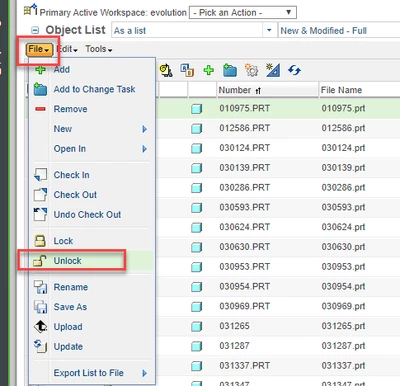
You should be able to unlock the top level in your workspace. When you attempt to modify the file, you will need to choose "continue" on the pop dialog instead of check out.

12-Amethyst
July 25, 2024

I do not know how to do this and i searched unlock on this community and asked a chief designer at work and i do not know how to do that.  I see lock on my assembly but i do not see unlock.  thank you for taking the time.  hope to hear back soon


CodyG

23-Emerald III
July 25, 2024

There are potentially several things happening. And your companies windchill setup will likely vary from mine.

The image you sent is a toggle, if it has a check, it is locked. Yours is unchecked, therefore it is unlocked.

It might help if you include a screen shot of what your workspace looks like for that specific line.

Here are a couple of things you can see in the workspace

The "State" value may be custom for your workplace, we mostly used released (unmodifiable) and work in progress (modifable)

You change the state by clicking the check box on the line of the item and then going to edit set state...your workplace may have processes in place to control this.


StephenW_0-1721930936891.png


Community Moderator
August 7, 2024

Hi @Cody_Godines,


I wanted to follow up with you on your post to see if your question has been answered. 
If so, please mark the appropriate reply as the Accepted Solution. 
Of course, if you have more to share on your issue, please let the Community know so that we can continue to help you. 


Thanks,
Anurag