
14-Alexandrite
August 17, 2022
Question

error while importing STEP File

  • August 17, 2022
  • 3 replies
  • 2167 views

hello 


while importing step file of gear,

the radius and flank surface are getting merged, 

How can we have seperate surface/ face for both selection, 


Image Description ( while selecting flank radius is also getting)image003.jpg
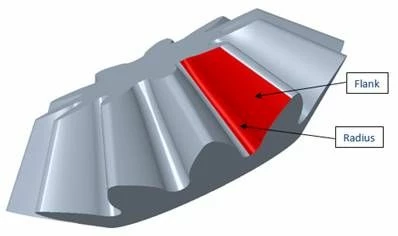
 

selected ) 

The surface for radius and flank should be different.

3 replies

tbraxton
22-Sapphire II
22-Sapphire II
August 17, 2022

What is the nature of those surfaces in the source file used to generate the STEP? Is the source file a solid model or surface model?


Is the import into Creo generating a solid model on import? If so, then there is surface connection information in the STEP file that creates quilts from surfaces that may be visible in the source file. 


If the surfaces of interest are separate surfaces in the source file then filter the export from the source model to export only selected surfaces.

14-Alexandrite
August 17, 2022

Step File is generated from the KISSSOFT SOFTWARE  and driectly exported into step file 

Patriot_1776
22-Sapphire II
August 17, 2022

You could try using the "Remove" command with the "Leave open" and "Keep removed surfaces" options and that should keep the surfaces as a separate quilt.

24-Ruby III
August 18, 2022

Hi,

just a note ... selected surface does not contain cylindrical sub-surface (no round surface is present).

MartinHanak_0-1660828255971.png


24-Ruby III
August 18, 2022

Hi,

please next time upload data in zip archives. rar archives are difficult to unpack using standard Windows functionality.