3-Newcomer
September 27, 2024
Solved

flexibility not visible when dragging components

  • September 27, 2024
  • 2 replies
  • 912 views

In Creo, flexible components such as springs, mounted in an assembly, do not graphically show their flexibility when dragging. How to solve this behavior? What can I do? And without using the mechanism! In short, I would like to see the spring that stretches and compresses when I drag the purple component without having to regenerate at the end of the drag. thanks in advance to anyone who can help me

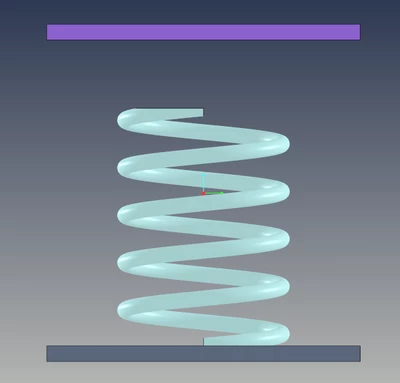
starting position
EB_11159537_0-1727428000829.png


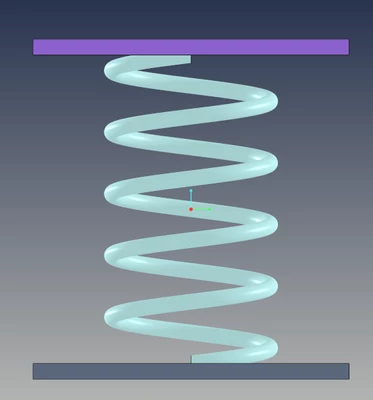
after dragging the purple component

EB_11159537_1-1727428029258.png


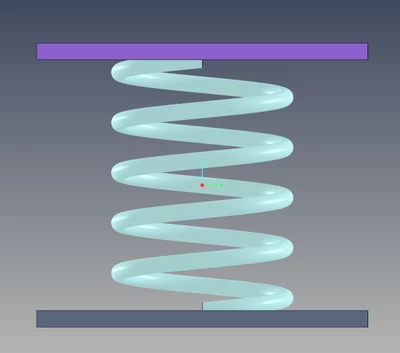
after regenerated

EB_11159537_2-1727428065691.png


Best answer by kdirth

 Creo cannot flex components as you drag them.  A regeneration is required to take the measurement and update the the flexed model.

If creo was constantly regenerating to keep up with the drag, performance would be greatly impacted.

2 replies

kdirth
21-Topaz I
kdirth21-Topaz IAnswer
21-Topaz I
September 27, 2024

 Creo cannot flex components as you drag them.  A regeneration is required to take the measurement and update the the flexed model.

If creo was constantly regenerating to keep up with the drag, performance would be greatly impacted.

There is always more to learn.
Catalina
Community Moderator
October 2, 2024

Hi @EB_11159537,


I wanted to see if you got the help you needed.


If so, please mark the appropriate reply as the Accepted Solution or please feel free to detail in a reply what has helped you and mark it as the Accepted Solution. It will help other members who may have the same question.
Please note that industry experts also review the replies and may eventually accept one of them as solution on your behalf.


Of course, if you have more to share on your issue, please pursue the conversation.

Thanks,

Catalina | PTC Community Moderator