

Solved
how do I leave skeletons out of my drawing
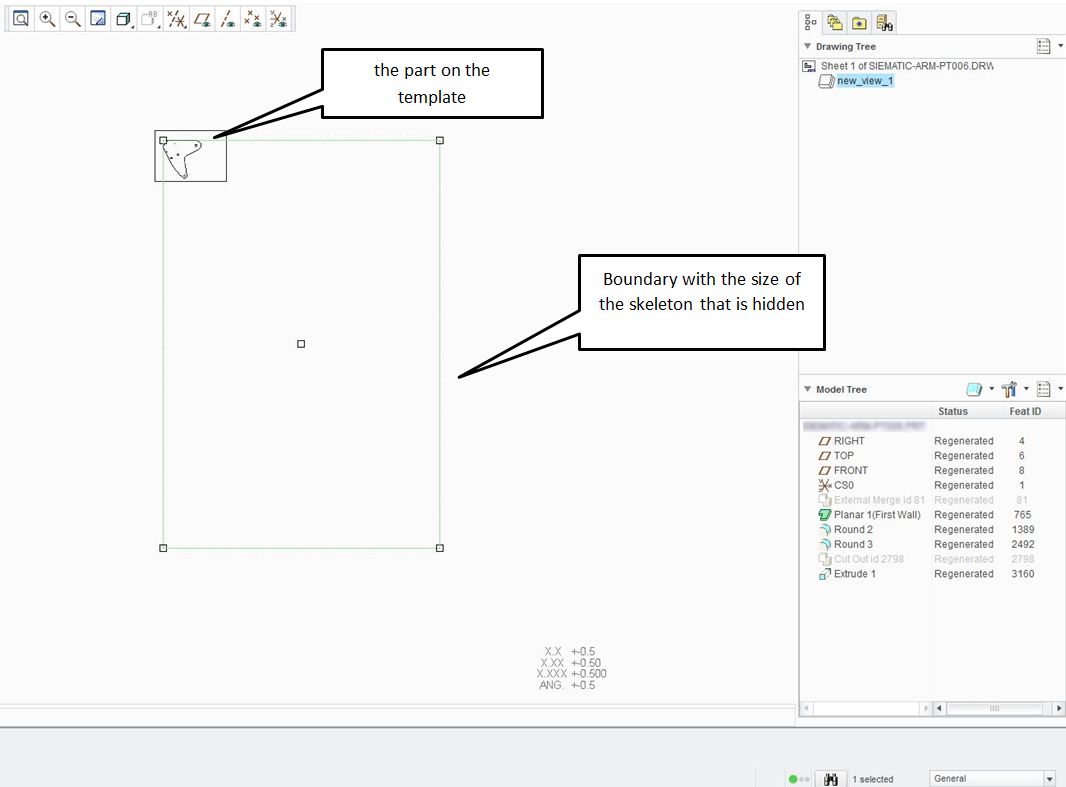
When I create drawings from parts that make use of a large skeleton (dimension-wise), there is a boundary around the part with the size of the skeleton.
This is very irritating when trying to create projections because the large frames overlap (so trying to select the right object becomes impossible).
Right now I solve this by creating a spline boundary (drawing view -> visible area -> partial view) all around the part to get a smaller boundary. This works but is a lot of work. Isn't there a setting to have the boundary only around solid parts or a setting to disregard skeletons or the possibility to resize the boundary with the mouse in the corner of the boundary?
This thread is inactive and closed by the PTC Community Management Team. If you would like to provide a reply and re-open this thread, please notify the moderator and reference the thread. You may also use "Start a topic" button to ask a new question. Please be sure to include what version of the PTC product you are using so another community member knowledgeable about your version may be able to assist.