
7-Bedrock
April 7, 2021
Solved

in drawing, is there easier way to dimension from Csys origin?

  • April 7, 2021
  • 3 replies
  • 2874 views

1) I have a customer part with a datum structure where the origin is off in space.

2) I figured out how to add a Csys to my Model 

3) I was able to use layers to get only that Csys to show up in my drawing view

4) Creo wouldn't let me dimension off the Csys.

I had to create datum planes using the Csys and then datum axes using those planes.

Using Show Model Annotations was finally get dimensions on in drawing with the axes.


Is there an easier way? or at least cleaner? model is going to get very messy with this process. 


(working in CREO 6.0.2)
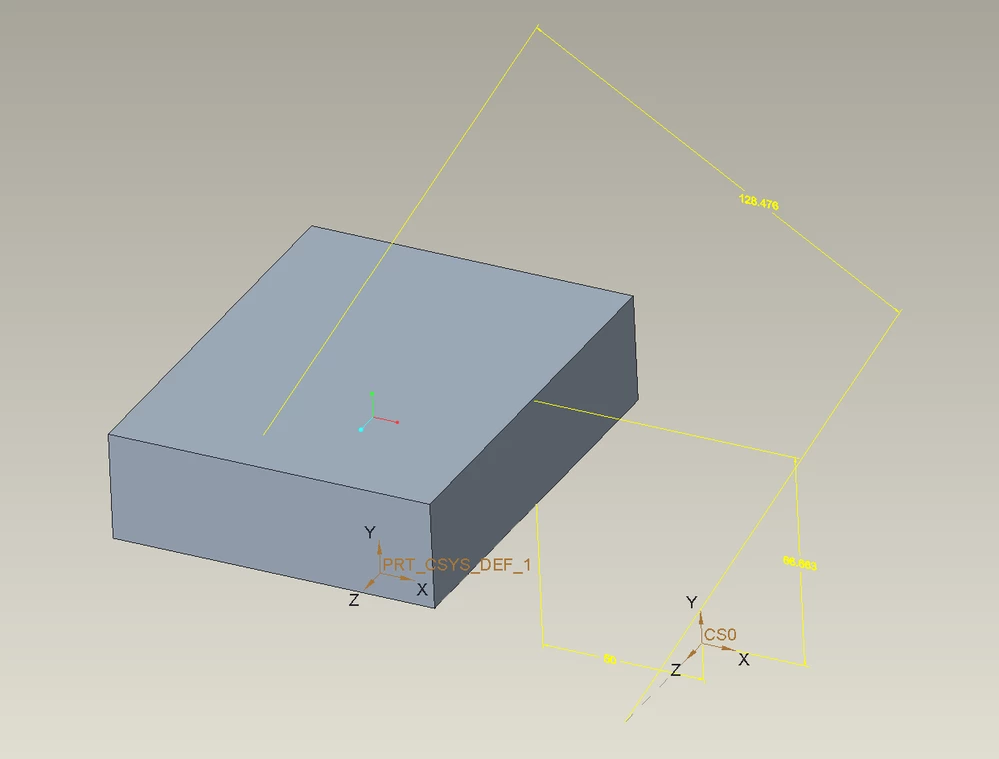
Best answer by tbraxton

It is possible to create model annotation dimensions. This shows dims relative to an offset Csys feature created in a part. You can then display these in a drawing view. 


tbraxton_0-1617814396955.png


3 replies

21-Topaz II
April 7, 2021

Hard to understand why you needed axes if datum planes were there - you can use datum planes in dimensions just fine. If there are too many dimensions and you don't like them being all crowded, you could use ordinal dimensions. If I have more than a few dimensions from the same starting point, I always switch to ordinal - it's much easier to understand, and if someone is programming from the drawing it will make their life easier.

TomK_MN7-BedrockAuthor
7-Bedrock
April 7, 2021

Planes show up as 2 lines on the drawing which would confuse folks. Also, a pain to hide all the planes I don't need in a given view.

Agreed that Ordinal Dims are great, but my problem is getting something on the drawing that I can select when creating annotations with "Dimension" or "Ordinate Driven Dimension".

tbraxton
22-Sapphire II
tbraxton22-Sapphire IIAnswer
22-Sapphire II
April 7, 2021

It is possible to create model annotation dimensions. This shows dims relative to an offset Csys feature created in a part. You can then display these in a drawing view. 


tbraxton_0-1617814396955.png


TomK_MN7-BedrockAuthor
7-Bedrock
April 7, 2021

I think this will work.

Is the  "+ Assign to State"/ "- Remove from State" the same as Show/Hide?

24-Ruby III
April 7, 2021

@TomK_MN wrote:

1) I have a customer part with a datum structure where the origin is off in space.

2) I figured out how to add a Csys to my Model 

3) I was able to use layers to get only that Csys to show up in my drawing view

4) Creo wouldn't let me dimension off the Csys.

I had to create datum planes using the Csys and then datum axes using those planes.

Using Show Model Annotations was finally get dimensions on in drawing with the axes.


Is there an easier way? or at least cleaner? model is going to get very messy with this process. 


(working in CREO 6.0.2)


Hi,

if I understand you well you need to create drawing dimension. I tested Creo 6.0.4.0. I can select CSYS name and model vertex (for example) and place dimension ... no problem.

dims.png

kdirth
21-Topaz I
21-Topaz I
April 7, 2021

Works in 4.0 as well.


There is always more to learn.