
12-Amethyst
February 5, 2023
Solved

"Make Transparent" command and Geometry Filter

  • February 5, 2023
  • 1 reply
  • 3762 views

I can't use the command MAKE TRANSPARENT (I don't mean the Transparent command to set the display state) with the Geometry filter. I must obligatorily select Body as filter.
But I can add that command in the mini toolbar in that Selection item...
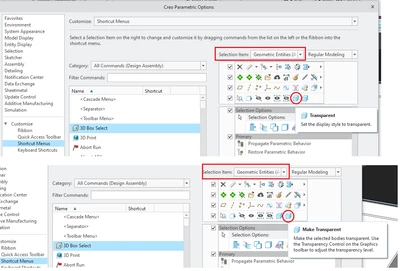
GiFra_Label_0-1675631004281.png

Is there a way to use Make Transparent with Geometry filter?


Best answer by mneumueller

No, I think the actual behavior is the intended behavior. If you select geometry, in assembly you act on the part transparency, inside a part you act on a body transparency.  If you select the body explicitly, then of course the command always relates to and acts on the body

1 reply

24-Ruby III
February 6, 2023

Hi,

what Creo version do you use ?

In Creo 9.0 I have Geometry filter selected when working on part. When I select Body using Pick From List command the mini-toolbar is displayed containing Make Transparent button.

12-Amethyst
February 6, 2023

I use 8.0.7.
If I select Body that command appears also to me, but I wonder if there is the possibility to use the command simply "touching the surface" with the geometry filter activated.

12-Amethyst
February 10, 2023

One of my colleague still has Creo 8.0.2, and he can make transparent parts with this command directly from the geometry filter.
Before passing to 8.0.7 I had the 8.0.4 and I couldn't do the same, and now with 8.0.7 I still can't.
Now also my colleague has passed to 8.0.7 and now he can't usa the command any more from Geometry filter.
So, was it a bug of 8.0.2 or still now with 8.0.7 is there a manner to use that command in the manner I've told?