1-Visitor
April 10, 2020
Solved

sheet metal half-shear button

  • April 10, 2020
  • 2 replies
  • 6947 views

Hi ... CREO4 user ..... trying to create a half shear button in sheetmetal part ... what is easiest/best way?

Best answer by pausob

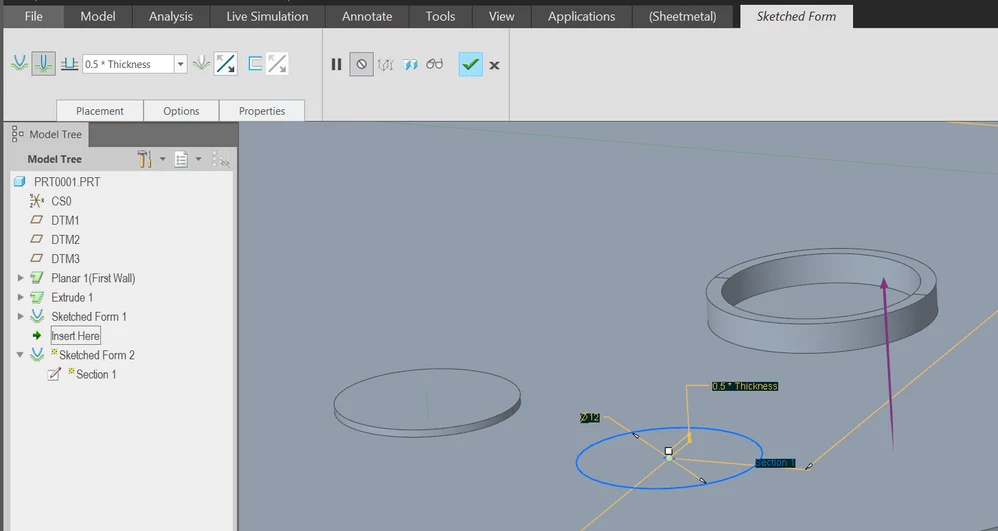
In the sheetmetal, use sketched form, change type to "piercing" instead of "punched" (2nd icon in the ribbon).

Then just sketch a circle...
 

half_shear_buttons.png 

2 replies

1-Visitor
April 10, 2020

BTW ... I tried to do a "sketched form punch" .... it made the small half-punched hole in the front surface, but creates a larger (added sheetmetal thickness) plug diameter on the back surface.    Hole diameter in front and plug diameter in back should be the same on a half shear button

23-Emerald III
April 10, 2020

Not sure what you mean by a half-sheer button, but how do you punch material and get the same diameter on both sides of your sheet?  The material has to be deformed someplace and I would expect the back side to be larger than the punch by the material thickness.


1-Visitor
April 10, 2020

hello, thank you for your reply, but for some reason it won't let me access that link  …. says "I don't have permission to view that directory" …. ???

pausob19-TanzaniteAnswer
19-Tanzanite
April 11, 2020

In the sheetmetal, use sketched form, change type to "piercing" instead of "punched" (2nd icon in the ribbon).

Then just sketch a circle...


half_shear_buttons.png 

1-Visitor
April 13, 2020

Perfect …. thank you very much !!