15-Moonstone
March 17, 2025
Solved

sweep cut creo vs solidworks

  • March 17, 2025
  • 2 replies
  • 2880 views

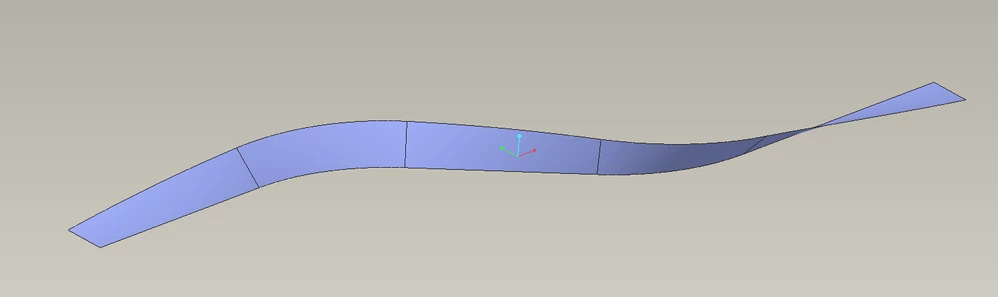
hello, I am stuck on cutting this profile on the sphere by sweep command but another hand in solid work this cut feature is so simple just like 123 and done... I need to know how to make this cut in creo...please check the pic and video

https://www.youtube.com/watch?v=Mpd3U3dI2BU&t=9s


time at 7:00 to 8:00 minutes.
Best answer by tbraxton

PTC tutorial for use of trajpar with VSS.


Use Trajpar with Solid Features | Tutorial | PTC Learning Connector


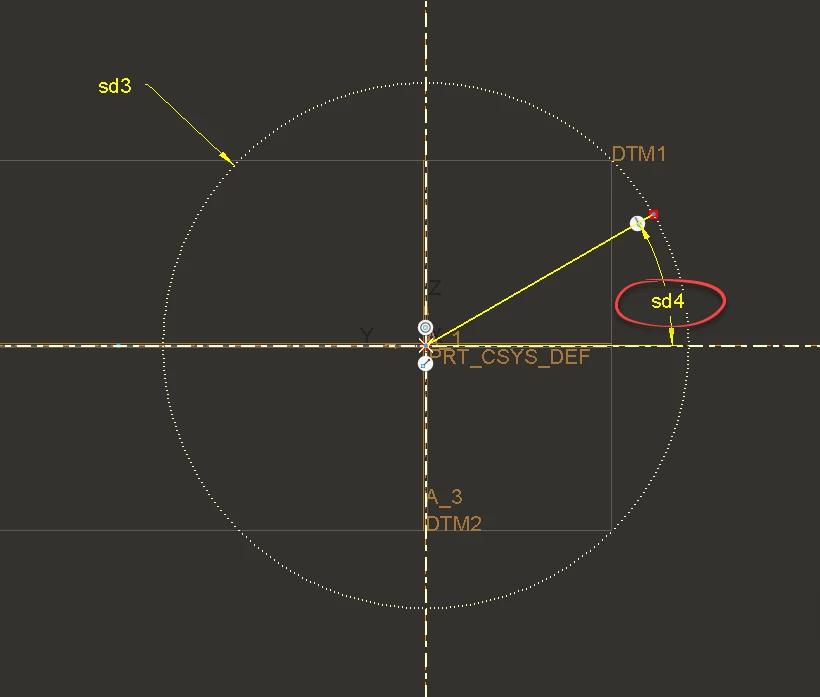
You need an angle dimension in the sketch of the sweep that controls the "clocking", use this dimension in the sketch relation inside the variable section sweep. The relation would be sd#=180*trajpar. This will twist the sketch from 0-180 degrees along the length of the trajectory.


Here is how it is used to twist a ribbon through 180 degrees.

Example sketch:

tbraxton_0-1742382701576.png

180 degree twist of the above sketch

tbraxton_1-1742382797176.png


2 replies

tbraxton
22-Sapphire II
22-Sapphire II
March 17, 2025

There are two options in Creo that come to mind to twist the profile for a sweep. From the video it appears that a variable section sweep should match.


1) Variable section sweep using the trajpar parameter to control the twist of the profile along the length of the trajectory.

About the Trajpar Parameter

2) Helical sweep feature

kdirth
21-Topaz I
21-Topaz I
March 17, 2025

I agree with @tbraxton, the variable section sweep using the trajpar variable is the way to go.  Can be accomplished just as fast as the processes in the video.

There is always more to learn.
kdirth
21-Topaz I
21-Topaz I
March 17, 2025

3 features:

kdirth_0-1742213084381.png


There is always more to learn.
asifcad15-MoonstoneAuthor
15-Moonstone
March 19, 2025

Can you please share the model you mentioned in your post or any example video related to this command?