
14-Alexandrite
November 6, 2014
Solved

symbol dimension

  • November 6, 2014
  • 1 reply
  • 3552 views

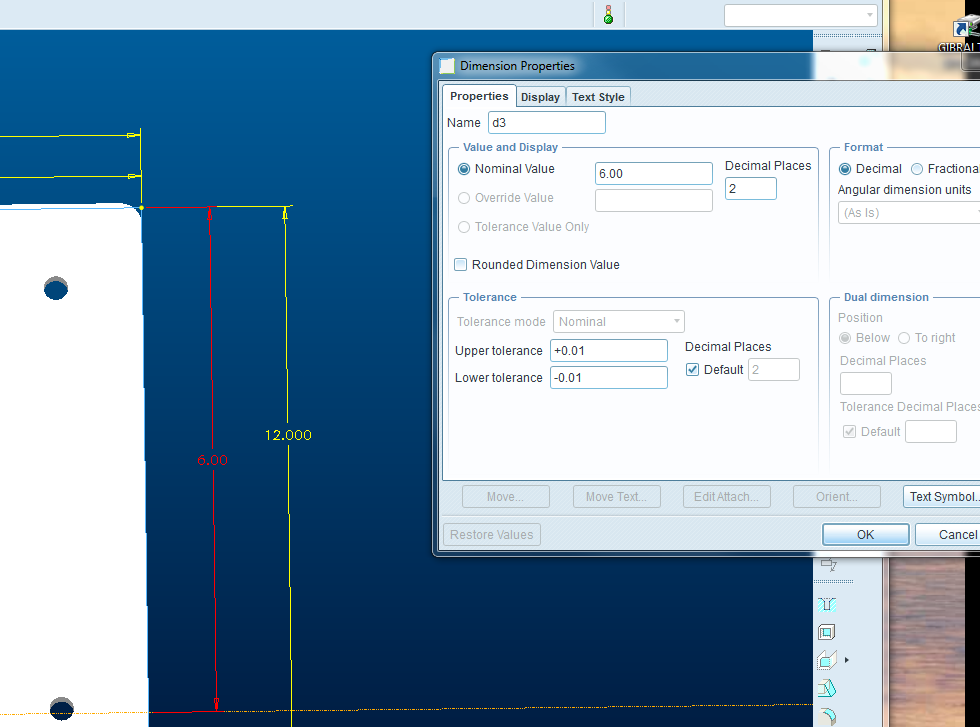
i cannot modify the symbol of dimension as shown in the image attached. with Creo 2.0

can you help me??


This thread is inactive and closed by the PTC Community Management Team. If you would like to provide a reply and re-open this thread, please notify the moderator and reference the thread. You may also use "Start a topic" button to ask a new question. Please be sure to include what version of the PTC product you are using so another community member knowledgeable about your version may be able to assist.
Best answer by Dale_Rosema

Finish making the extrude/revolve feature.

The right click on the feature in the tree and select "edit" (not edit definition).

The dimensions will show up. (You can switch to the names if you like).

The select the dimension you want and the right click and go to properties.

Edit in the "Name" box.

attach_image3.PNG

For mine it is d3.

Thanks, Dale

1 reply

Dale_Rosema
23-Emerald III
23-Emerald III
November 6, 2014

Christian - No image attached.

Thanks, Dale

cspinelli14-AlexandriteAuthor
14-Alexandrite
November 6, 2014

Now?

cspinelli14-AlexandriteAuthor
14-Alexandrite
November 6, 2014

not yet,

i have attached. i want to replace sd0 with a textSymbol.jpg