
10-Marble
September 17, 2023
Solved

template part colors in Creo 10.0

  • September 17, 2023
  • 2 replies
  • 3814 views

Hi, recently changed to Creo 10.0 and noticed that the "standard color" for start templates is not the usual grey anymore. Instead volume parts are kind of lilac, while sheetmetalparts are slighly green.


Is there anyway to change this back to the standard grey? I could of course color the templates now, but all of my older projects look lilac and green.
Best answer by tbraxton

I have not used Creo 10 yet, perhaps something has changed with the color maps in appearances. You can of course export the .dmt file from a previous build and import that as well.


If you want to experiment with a custom DMT based on RAL color references, take a look at the one enclosed. There are multiple choices for "grey" available.


tbraxton_1-1695005987013.png


2 replies

tbraxton
22-Sapphire II
22-Sapphire II
September 17, 2023

Change the theme used for system appearance. If Creo 10 does not offer the theme you want, then go back to the previous Creo version and save a custom theme that you can then import into Creo 10. The "themes" use system color files (*.scl) for definition of the UI colors.


Refer to these links for how to implement details.


About System Appearance (ptc.com)


Tips & Tricks: New Interface Themes in Creo 4.0 | PTC

10-Marble
September 17, 2023

Yes, it was my initial idea, that the colors had to be configured somewhere in the .scl file.


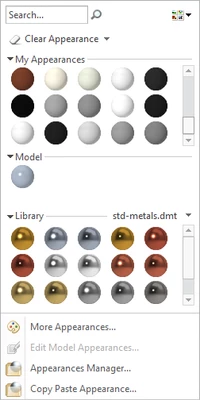
But as it turned out PTC changed the "default.dmt" file. If anybody else is having the same issue and you want to change the "uncolored" solids and sheetmetal, I attached a screen.

tbraxton
22-Sapphire II
tbraxton22-Sapphire IIAnswer
22-Sapphire II
September 18, 2023

I have not used Creo 10 yet, perhaps something has changed with the color maps in appearances. You can of course export the .dmt file from a previous build and import that as well.


If you want to experiment with a custom DMT based on RAL color references, take a look at the one enclosed. There are multiple choices for "grey" available.


tbraxton_1-1695005987013.png


24-Ruby III
September 18, 2023

@trailFileFnatic wrote:

Hi, recently changed to Creo 10.0 and noticed that the "standard color" for start templates is not the usual grey anymore. Instead volume parts are kind of lilac, while sheetmetalparts are slighly green.


Is there anyway to change this back to the standard grey? I could of course color the templates now, but all of my older projects look lilac and green.


Hi,

please do following:

1.] start older Creo version, open model and publish a picture of Creo window

2.] start Creo 10, open the same model and publish a picture of Creo window

3.] start Creo 10, create new model and publish a picture of Creo window

4.] upload the above mentioned models

24-Ruby III
September 18, 2023

... you can also test template models available OOTB in Cre installation.