
Solved
unable to access files
I am using Creo Parametric 8.0 8.0.1.0
I am unable to access files on another computer that we currently use as our storage/server It does not even show up as an option for access

I am using Creo Parametric 8.0 8.0.1.0
I am unable to access files on another computer that we currently use as our storage/server It does not even show up as an option for access
The easiest way is to share the location on the hosting computer and then map the drive so you don't have to go thru the network folder sturcture, which can take a long time if there is a lot of computers on the network. I also don't get anything when I click on NETWORK but most of our computers don't have shares and the ones that do are all "hidden shares" so they don't just show up.
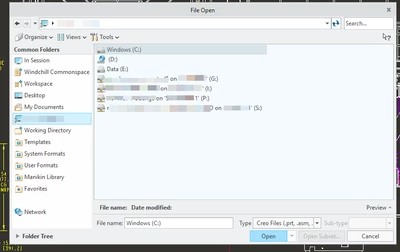
Just as an example, I have 4 mapped drives... (names blurred to protect the innocent!)
Enter your E-mail address. We'll send you an e-mail with instructions to reset your password.