
1-Visitor
March 2, 2014
Question

vessel design, man hole, nozzle

  • March 2, 2014
  • 3 replies
  • 8151 views

Dear Folks

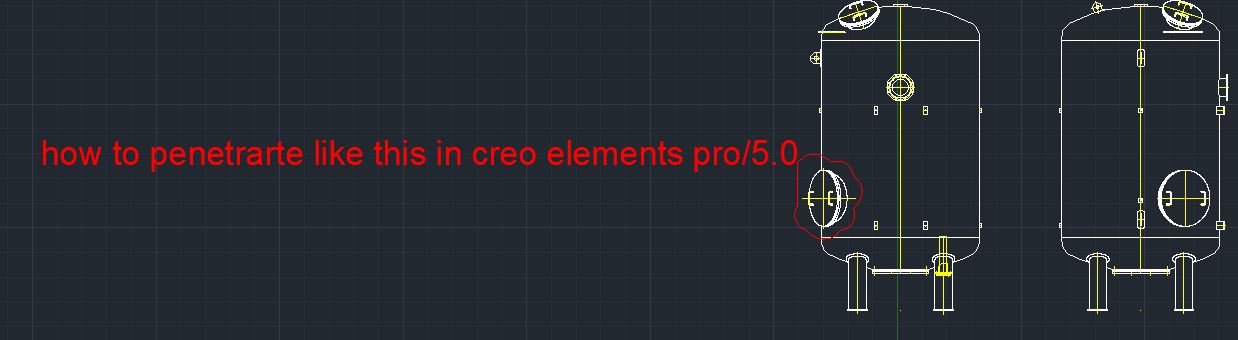
How to create in creo elements pro 5.0 by below attached screen shot.

Just assume the dimensions. I have to know which tool can be used to create like this?
vessssel.JPG

Thanks in advance

Viswanathan.K


This thread is inactive and closed by the PTC Community Management Team. If you would like to provide a reply and re-open this thread, please notify the moderator and reference the thread. You may also use "Start a topic" button to ask a new question. Please be sure to include what version of the PTC product you are using so another community member knowledgeable about your version may be able to assist.

3 replies

Dale_Rosema
23-Emerald III
23-Emerald III
March 3, 2014

Are you trying to get the flat plate layout of the plate for the tank given the fact that you have the manhole ring in the vessel? If so, I would do an extrude cut in the plate for the weld clearance around the manhole ring in the plate with kerf and bevel as necessary (kerf could come with the extrude, the bevel would be a secondary operation - adding the chamfer). Then flatted the plate out after the the material has been removed. It should be close enought for weldeding the pressure vessel.

As for the vessel design, it depends upon which section of the code required for the build. Is it ASME Section I, IV or VIII? The code is very specific for the the material and design of the vessel and what safety factors are needed in your calculations.

Do you have certified welded for the construction of the vessel. The head of the vessel can most likely be purchased from a certified vendor as well as the nozzles and man holes. The manholes are usually bought in a set. The ring and the cover with it's fasteners.

If this is a none code vessels, then it is up to you basic engineering design for stresses.

Thanks, Dale

visu1-VisitorAuthor
1-Visitor
March 8, 2014

Dear Dale

Actually what am i trying to say is, in creo elements pro, how to merge the vessel surface and man hole, i have extrude the man hole, I am not able to merege both and some distance was there. if i fill the distance i willl get excat like that as above phot.

How to merege the vessel surface and man hole using creo elements pro/5.0 by sheet metal.

Some example screen shot i have created, just view it.

Capture 1.JPG

Capture2.JPG

Thanks advance

Viswanathan.K

1-Visitor
March 10, 2014

you could create 2 cylinders assemble them in an assembly, then use component operations cut out

cut the large cylinder to from the small one

then convert the solid small cylinder to a sheet metal part using operations convert to sheetmetal and use shell then you could cut a section from the cylinder to allow it to be unfolded i will post a picture with the work flow during my work break

G

1-Visitor
March 10, 2014

Isn't it possible to use "extrude to selected"?

Or is this Creo functionality, not in older Pro/E versions?

I'm currently developping a very advanced vessel desiger in Creo + SmartAssembly.

Drawing vessels like this should be 15-20min of work, including most 2D drawings.

visu1-VisitorAuthor
1-Visitor
March 10, 2014

Dear Jeroen

Coud you guide me how to create like advance?

Regards

Viswanathan.K

1-Visitor
March 11, 2014

Hello,

SmartAssembly is not something that is ready "off the shelf".

It is a blank environment in which you can start programming.

Part of the programming is by creating models in 3D, the other part is writing code.

It's a bit like programming in BASIC or VBA. It is not that hard if you are a bit familiar with programming.

The best way to start with this, is to find somebody (engineering company or PTC supplier with SmartAssembly knowledge).

It is, depending on your requirements, much to very much programming.

But afterwards, you will win much time!

1-Visitor
March 16, 2014

hi visu

i m also involved with boiler vessels and nozzles (cylinderical, spherical, elipsoidal dishes,etc)

it involves only simple extrude or revolve, no need of assembly

1. make the base vessel by extrude or revolve

2. make a datum plane parallel to the axis of the base vessel at the specific height

3. then with this datum plane as the sketching plane extrude until next or selected(surface) option

you will get a nozzle surface merged with the vessel surface

like this you can cut a dish(for nozzle) from the vessel or make a cut in the base vessel for the recieving nozzle also