cancel
Showing results for 
Search instead for 
Did you mean: 
cancel
Showing results for 
Search instead for 
Did you mean: 

Community Tip - If community subscription notifications are filling up your inbox you can set up a daily digest and get all your notifications in a single email. X

Translate the entire conversation x

work with part apperance color and body apperance color

MW_7632680
6-Contributor

work with part apperance color and body apperance color

Hello Community,


We have many parts that were created in an old version of Creo when there was no multi-body function yet.
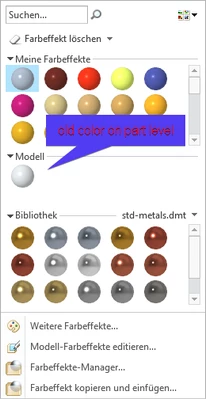
All of these parts have the color assigned to the part level.
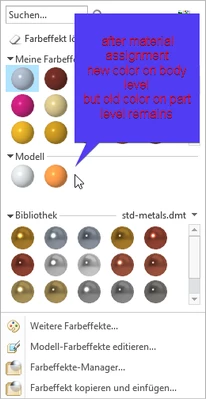
If I now change the material, the new material color is assigned to the body level.
However, the old part color remains in the model.


When I export a STEP file, the old color of the part is used and the new color of the body is ignored.


Yes, I can manually delete the color from the part level, but that takes a lot of effort for each part.

Is there a way to automatically remove the part appearance color from all parts?
Or is there a way to apply the color to both the body and the part when assigning the material?


Thank you!
 

MW_7632680_0-1769683647362.png

MW_7632680_2-1769683813296.png


1 REPLY 1
tbraxton
22-Sapphire II
(To:MW_7632680)

 Appearances can be assigned at the surface, body, or part level, with surface-level appearances overriding body and part appearances, and body-level appearances overriding part-level appearances. This paradigm is applicable within Creo but (apparently) is not extended to STEP export.

AP214 STEP supports color information but I think it has a different hierarchy than that of Creo. When exporting STEP using AP214 color assigned to the part seems to override that of a body. If the part appearance is unassigned, then the body appearance is exported. You would need to ask PTC if this is functioning to specification.

I don't think there is any built-in function to clear the color assignment automatically. You could in theory clear the part appearance using a mapkey or API script and Pro/Batch to process many parts at once if you had to open each file individually for processing. If you have an assembly in session with the relevant parts, then you may be able to use a saved search query with a mapkey to clear the part appearances of all of them with one user interaction and a mapkey would make it fast. You would use the find tool to select all parts in the assembly automatically with the saved query and then clear the appearance of all selected parts with a mapkey. The mapkeys maybe can be nested for a single macro-operation but I am not positive about that. Worst case is user would run two mapkeys to clear the appearance of all parts in an assembly.

========================================
Involute Development, LLC
Consulting Engineers
Specialists in Creo Parametric
Announcements
NEW Creo+ Topics: Real-time Collaboration

Top Tags