10-Marble
April 22, 2025
Solved

Creo Illustrate 11.1 - To View the Section in 2D View

  • April 22, 2025
  • 2 replies
  • 682 views

Hello!


My team is looking into the Sectioning tools of Creo Illustrate.  We are running Windows 11 mostly with Illustrate 11.1


While reading through the Documentation, we found this page


To View the Section in 2D View

It refers to a "Show 2D View" button in the ribbon menu in the Sectioning tab, then the Setup group.  Looking at my Creo Illustrate, I see no such button there.


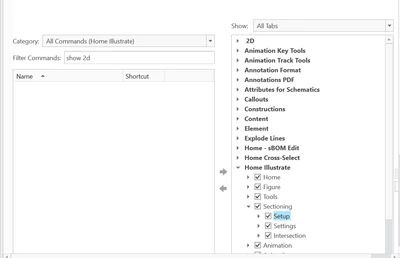
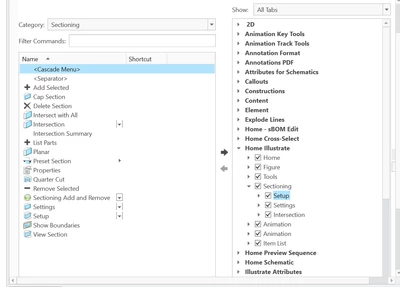
I figured it may be hiding, so I went into the ribbon customization menu, and looked for "Show 2D View", as well as looking at everything tool in the Sectioning Category.  I couldn't find anything
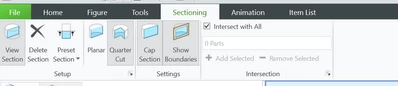
 

Mwolfe_mn_0-1745359224751.png


Mwolfe_mn_1-1745359323717.png

Mwolfe_mn_2-1745359345836.png


Would someone be able to let me know how me and my team can access the Show 2D View feature for sectioning in Creo Illustrate?  I'm probably missing something.


Thanks!


Best answer by agarland

Unfortunately this is a mistake in the OLH.

This feature is not available in illustrate, it is a Creo View feature.


Apologies for the confusion.

2 replies

14-Alexandrite
April 23, 2025

Hi Mwolfe_mn (why nobody has a real name here in the forum?),


I haven't seen this function in Creo Illustrate yet. I only know the button from Creo8:

Ramon_Bohne_0-1745390511046.png


In my opinion, at the moment this function wouldn't make much sense in Creo Illustrate either, right?


So, I suspect this is a mistake in the Creo Illustrate online user manual!?


Best regards

Ramon Bohne

(Siemens Energy)

agarland16-PearlAnswer
16-Pearl
April 23, 2025

Unfortunately this is a mistake in the OLH.

This feature is not available in illustrate, it is a Creo View feature.


Apologies for the confusion.

Mwolfe_mn10-MarbleAuthor
10-Marble
April 23, 2025

Got it.  Thanks @agarland !