14-Alexandrite
May 3, 2023
Solved

Creo Illustrate, Detail view of a detail view

  • May 3, 2023
  • 1 reply
  • 2111 views

Hello all,


as I have learned here in the forum 😀, and which also works very well 👍, if I want to show only a small area of a model, I proceed as follows:


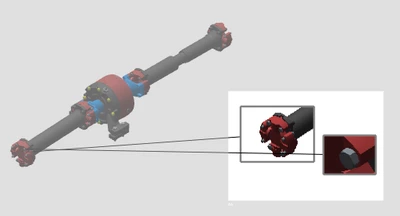
1. define a 3D page and place the model next to it. Then I create a detail that I place on the 3D page. I hide the connecting line.


My problem now: I want to show an enlargement (detail) of this section.


2. I can now show a detail, but the detail aerea is on the model next to my page.


3. when I move the detail area to my detail, it is empty.


Question: Is it possible to create a detail view of a detail view? If so, how?


Thanks and best regards

Ramon.
 

Best answer by agarland

Hi Ramon,


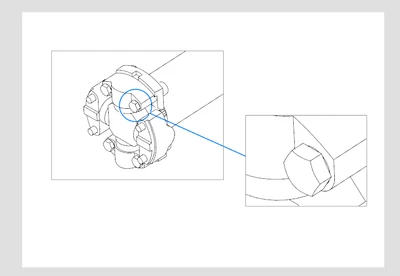
The only way I can think of doing this, is to add two separate insets in the 3D figure (see below).

3D figure - two insets.png

I've only shown the leader lines to illustrate what I mean.

Then create a 2D figure from that and add the leader line and focus border (show as blue lines) manually.

2D figure - with leader added.png


Not sure if that solves your issue completely, but this is the only way I can think of doing it.


Regards

Adrian


1 reply

agarland16-PearlAnswer
16-Pearl
May 4, 2023

Hi Ramon,


The only way I can think of doing this, is to add two separate insets in the 3D figure (see below).

3D figure - two insets.png

I've only shown the leader lines to illustrate what I mean.

Then create a 2D figure from that and add the leader line and focus border (show as blue lines) manually.

2D figure - with leader added.png


Not sure if that solves your issue completely, but this is the only way I can think of doing it.


Regards

Adrian


14-Alexandrite
May 5, 2023

Hello Adrian,


Yes, I had already thought of the solution you showed.


If there is no other solution, I will do it that way.


Unfortunately, the manually created guide line does not close at the other two black lines (because of the white shadow), and it also runs under the border of the main section.

Result.jpg


In this respect, I have to retouch the image afterwards with a graphics tool, which I wanted to avoid.

But the effort is limited. That's why I'm doing it this way.


Thanks and best regards

Ramon