8-Gravel
October 29, 2025
Solved

Creo Schematics 7.0.0 XML export/import to Creo 7.0.8 Logical Data

  • October 29, 2025
  • 2 replies
  • 431 views

I was able to import the XML from Creo Schematics and autoroute my harness, however, the spools imported by the XML are locked and I'm not able to edit them in Creo. i.e. if I want to change the bend radius or the color or any other parameter in the spool, the spool it's locked.

Image on left shows the locked icon and image on right shows unlocked spool

 

 Locked icon in model treeLocked icon in model treeUnlocked icon in model treeUnlocked icon in model tree

Best answer by Gaby_K

Hi , 
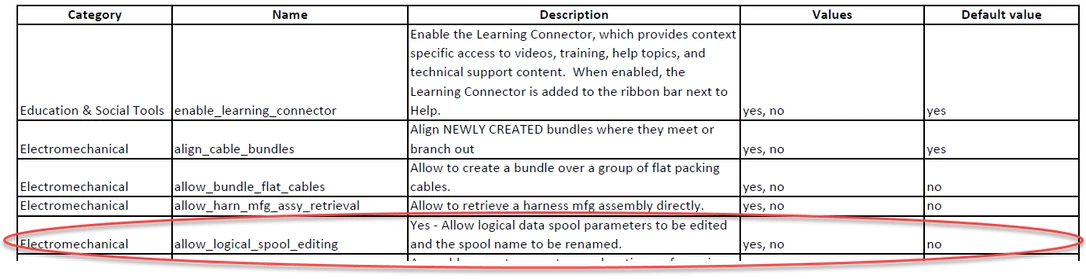
in order to edit spools which came from XML , you need to use the config option allow_logical_spool_editing ; 

the idea is :
if somone set spool parameters in Creo Schematics , it was done from a reason ( and assuming these values are according to manufacture specs). 

the correct workflow should be to update schematics and import again so both logical (schematics) and mechanical (Cabling) designs will be aligned with same values. 


Gaby_K_0-1762169656214.png

best regards . 

2 replies

24-Ruby III
October 30, 2025
ASA8-GravelAuthor
8-Gravel
October 30, 2025

Thanks @VladimirN but it's not that kind of lock I'm experiencing. It's a spool in cabling. See images I uploaded on initial post. 

Gaby_K12-AmethystAnswer
12-Amethyst
November 3, 2025

Hi , 
in order to edit spools which came from XML , you need to use the config option allow_logical_spool_editing ; 

the idea is :
if somone set spool parameters in Creo Schematics , it was done from a reason ( and assuming these values are according to manufacture specs). 

the correct workflow should be to update schematics and import again so both logical (schematics) and mechanical (Cabling) designs will be aligned with same values. 


Gaby_K_0-1762169656214.png

best regards . 

ASA8-GravelAuthor
8-Gravel
November 3, 2025

@Gaby_K Thank you that setting fixed my issue