
1-Visitor
March 14, 2014
Question

ERROR PRINTING MONOCHROME CREO VIEW LITE 2

  • March 14, 2014
  • 3 replies
  • 2963 views

Cannot PRINT in Monochrome format from CREO VIEW Lite 2.0 (M040 build 15) . It happens with all the printers. It ignores the setting and always prints in Grayscale.
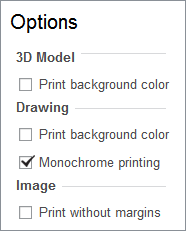

CreoOptions.pngCreoVersion.png

Thanks and kind regards,

Diego García

3 replies

12-Amethyst
April 11, 2014

Hello Diego,

we are using exactly the same creoview version/datecode but I cannot reproduce your issue.

I suppose it works with CreoView standard or full editition ? Do you have the prolems also whn creating a pdf file ?

Regards

Klaus

14-Alexandrite
August 28, 2014

Hello All

I am searching the option "monochrome printing" to add it to the admin_prefs.xml file.

I would like to preset this for all our users.

I searched multiple forums, ptc community and the "ProductView_prefs" file.

Perhaps I am blind.

We use CREO VIEW 2.0 M040 Build 15.

Somebody can help me?

Regards,

Marc

24-Ruby III
August 29, 2014

Diego,

I think that Creo View IS NOT ABLE to print BLACK&WHITE drawing. Monochrome print = Grayscale print. Ask PTC Support if you need to confirm my idea.

Martin Hanak

1-Visitor
September 2, 2014

Yes, that's right! Monochrome means grayscale.

I found a hint in our database:

Workaround: Select Monochrome printing using the Advanced Print Options accessible from the Print dialogue, which result in 1-bit black and white printed output

This is from article CS5297 : ProductView 9.1: How to print as black on white (Monochrome) instead of Greyscale?

https://support.ptc.com/appserver/cs/view/solution.jsp?n=CS5297

14-Alexandrite
September 2, 2014

Hello Gunter

Is there also a option in the admin_prefs.xml of creo view 2.0 to print in monochrome as a standard?

I am searching this options through the hole .xml file.

Regards,
Marc