
10-Marble
August 2, 2016
Question

Help: How do I make leaders go in front of geometry and not behind?

  • August 2, 2016
  • 5 replies
  • 6742 views

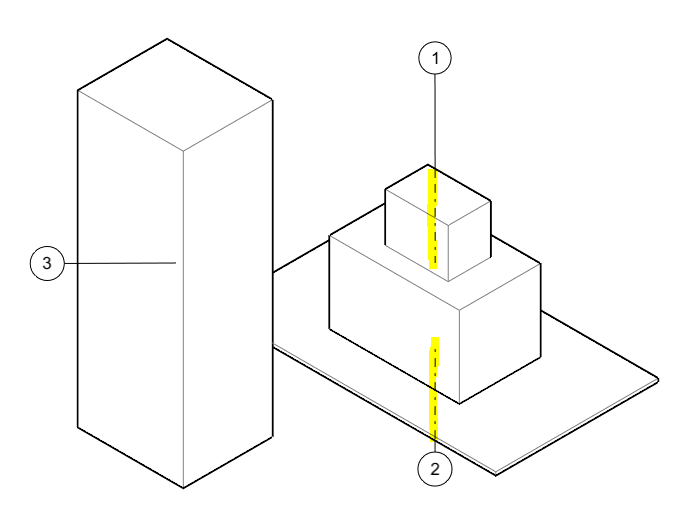
When generating annotations many leaders want to go behind the geometry (see yellow mark on leader 1 and 2). I find that annoying. Is there a trick to making the leaders go like leader 3, in front of geometry?  I would prefer just to right click on the leader and make it one or the other.
geometri.png

5 replies

nordlig10-MarbleAuthor
10-Marble
August 12, 2016

Maybe this is a support-grade-question sooner than a "community" one?

23-Emerald III
August 12, 2016

To be honest, I didn't really understand what you were asking. Creo doesn't have a move to front option like MSword.

nordlig10-MarbleAuthor
10-Marble
August 19, 2016

Ok, thanks. Creo Illustrate would benefit from it 🙂

23-Emerald III
August 12, 2016

What version and build of Creo are you using?

I just tried it on Creo2m220, 3 components stacked up and put BOM balloons as well as a Note balloon and all my leaders are on top of the geometry.

nordlig10-MarbleAuthor
10-Marble
August 19, 2016

It's Creo Illustrate 3.1 M010. If I relocate the leader end pointing to the geometry I can sometimes make it go in front.

1-Visitor
August 12, 2016

I expect it has to do with the attachment point. If it is on the visible side the leader will be entirely visible; if it is to the hidden side it will will change font to show that part of the leader is hidden.

This looks more like an illustration program than Creo Parametric.

nordlig10-MarbleAuthor
10-Marble
August 19, 2016

It's Creo Illustrate 3.1 M010 and I will investigate what you said about attachment point - maybe there is a setting/prefs/conf about that. I cant do anything with the leader except moving the ends pointing on the geometry and the balloon. Moving that sometimes makes it go in front but then it doesn't point to the center of the object. Maybe it snaps to another surface wo the application telling me about it. I need to take control of this.

1-Visitor
August 19, 2016

It's based on as David said the attachment point as well as where the balloon is relative to that attachment point in space and whether the leader passes through or behind geometry (dashed means it is passing through or behind). Try rotating the view to see where the balloons are in relation to your parts and to see what parts the leaders are passing through or behind.

nordlig10-MarbleAuthor
10-Marble
August 19, 2016

It's Creo Illustrate 3.1 M010 sBOM mode 🙂

nordlig10-MarbleAuthor
10-Marble
August 22, 2016

Visualize? - What is that? Is it an application? I put this in the "Illustrate" category of Creo?

23-Emerald III
August 22, 2016

Just to clarify what Steven was saying. Visualize See image below ABOUT that sub-section of the community.

Toby Metcalf Is the name "Visualize" something that PTC chose? Seems like an arbitrary name that means nothing to nobody????

Illustrate and Creo View are included...they are not really similar, right???