
6-Contributor
March 7, 2023
Solved

Creo Simulate using saved autogem meshes in top assembly

  • March 7, 2023
  • 1 reply
  • 3420 views

Can an autogem mesh created from a subassembly and saved be re-used in a top-level assembly autogem mesh?  I'm using Creo Simulate (Creo Parametric 7.0.10.0), native mode.


I have saved several subassembly meshes and I would like to use them in a top-level assembly, but I'm unable to make it work.  The subassembly meshes do not appear in the top level with all the connections that were created at that level;  I must recreate them at the top level.  The saved meshes are stored in the active workspace in Windchill as .mma files (.mmp files for parts).


I noticed that there is more literature available related to assembly meshes when using FEM mode.  Is that the mode I should be using to create and save meshes for this task?  Can this not be done using native mode?


Thanks!


Best answer by SweetPeasHub

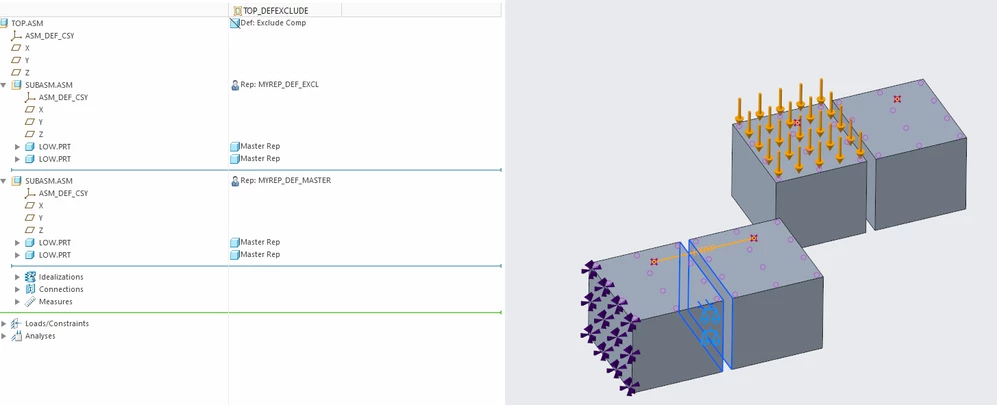
You can use simplified reps but the default needs to be master so the assembly level simulation model gets propagated upward. Change anything that inherits the default exclude to be explicitly excluded, then change the default to master. I am not saying the everything has to be master but that only items that are at master will be included in the model and this includes at the assembly level. This also allows you to not include the assembly simulation model if you do not want it, by setting it to default exclude in whatever simplified rep is active. Just because parts within an assembly are master does not mean that the assembly containing them is set to master. Hopefully this all makes sense to you now. I think they should have had two settings for the assembly, both whether it was master or exclude at the assembly level and whether the default for sub-parts/assemblies would be master or exclude.


-regards


Note in my screenshot how the spring which is in the subassembly model is not present in the model that is set to default = exclude within a user defined simplified rep.

SweetPeasHub_0-1678466162581.png


1 reply

17-Peridot
March 9, 2023

Hierarchical meshing is not supported for native mode. It might be possible for PTC to add this but there are significant technical challenges, with limited benefits since the top level still needs to validate the mesh and mesh anything missing. I am guessing that meshing from scratch could be faster than the steps needed to manage the hierarchical meshing. The original idea of Autogem is that it meshes automatically after you start the analysis. (at least since 1998 when I first used it). Is there some underlying reason you want to use a hierarchical mesh? For example are you able to mesh parts and subassemblies but difficulty at the top level? There are a lot of tips and best practices on building more complex models that the community could help you with.

6-Contributor
March 9, 2023

Thank you for the response.  I suspected that hierarchical meshing wasn't available in native mode, thank you for confirming.


I am able to mesh at the top assembly in native mode, but wanted to know if there were ways to streamline the meshing and inclusion of subassemblies that are used in multiple locations at the top assembly.  For example, I am using a subassembly in three locations, and I wish to define a rigid link between two components within that subassembly.  If I could create them at the subassembly level, and then bring that mesh into the top assembly, I wouldn't need to create the other rigid links at the top level, since they would already exist at the lower level and would ideally be recognized at the top level.  Currently, I'm defining those rigid links for each instance of the subassembly at the top level.  


Another case would be creating a more complex subassembly mesh with lumped masses, weighted links, etc. as a quick first-cut representation, which again, I'm able to do at the subassembly level and evaluate results (modal analysis, for example).  It would be great to be able to bring that subassembly, along with all its previously defined masses, links, etc. into a top-level assembly, which would then have additional constraints and connections pertinent to the top level.  I could then run a modal analysis, for example, at the top level, with the simplified subassembly mesh participating in the top-level modal analysis.  Currently, if I want to do a modal analysis at the top level using a simplified subassembly, I have to recreate all the idealizations and connections at the top level as well.


Maybe I'm not using the correct approach.  I would be interested in learning more about building complex models that you reference in your reply.

17-Peridot
March 13, 2023

Hi Jeff,

You can choose a simplified rep called "user defined" then select the name of the rep. you saved. For example I use "FEA_REP" so it is clear that the rep is specifically for FEA. 


In the subassembly- make a rep. specific for FEA

  SweetPeasHub_2-1678721955427.png


Then in the level above choose the USER DEFINED and select the FEA_Rep within the lower subassembly.

SweetPeasHub_3-1678722017176.pngSweetPeasHub_4-1678722052558.png


Also,

It is best if someone has answered your original question to mark the post as the solution so they get credit and so questions and answers can be found by the community. Chains of questions, and conversations, although related can become detached from the original question. As your question has evolved into how simplified reps work, this is best addressed by searching that topic or starting a new question if the existing info. is insufficient. As far as other tips and tricks, there are too many to respond with and there are varying categories. You can subscribe to see any posts to the entire Creo simulation section in your email inbox (use a rule to organize them into their own folder so you can browse them when you want and not clutter your inbox. You can also browse for my posts and I would note another advanced contributer @skunks has some good tips.


I searched for simplified reps and found some resources that can help you further your understanding.

Some simplified rep related posts.

https://www.ptc.com/en/support/article/CS319084?source=search


https://www.ptc.com/en/support/article/CS285908?source=search


https://community.ptc.com/t5/3D-Part-Assembly-Design/How-to-create-new-simplified-rep-in-toplevel-assembly-using-reps/m-p/333465/highlight/true#M11166


https://community.ptc.com/t5/3D-Part-Assembly-Design/How-to-assemble-simplified-reps-into-master-rep/m-p/115062/highlight/true#M7756