
15-Moonstone
July 20, 2017
Solved

evaluate command mapkey within relation editor

  • July 20, 2017
  • 2 replies
  • 3073 views

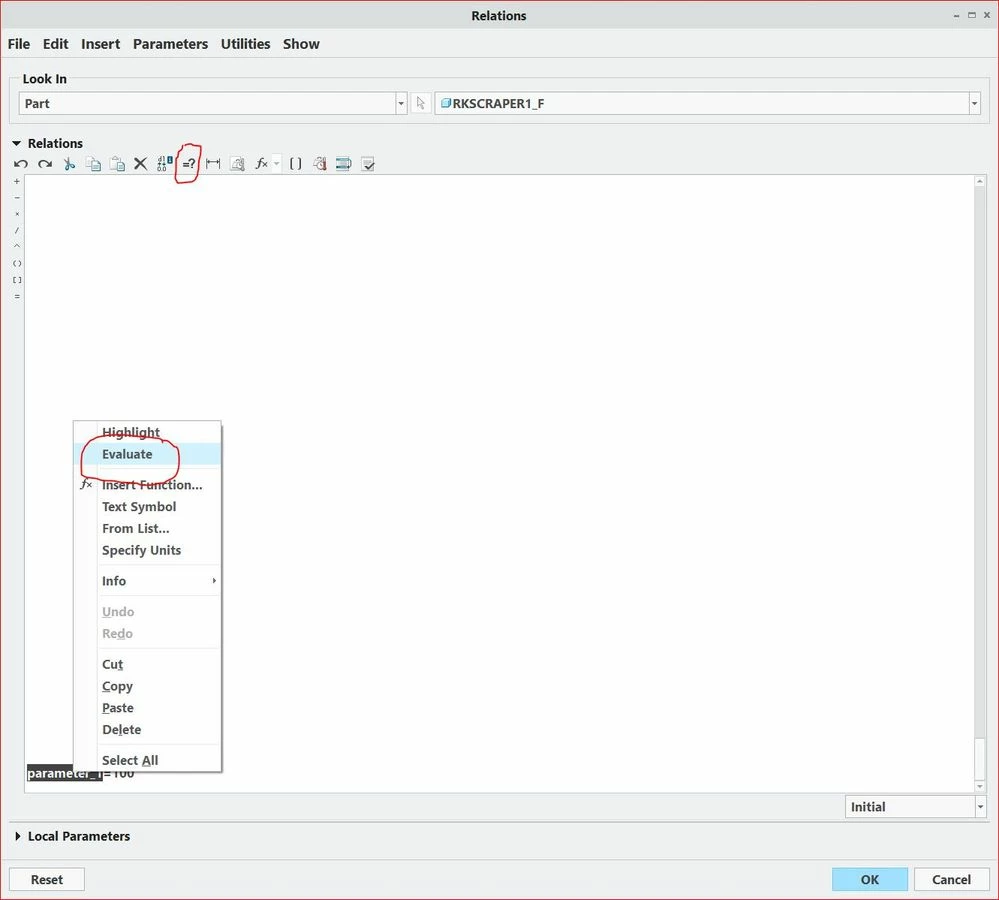
Is it possible to create a mapkey that would run the evaulate command within the relation editor?

I can use the button in the relation editor "=?" but I would love to have a keyboard short cut for this command.

I'm guessing it would have to be a function key like $F4. 

I can create the mapkey and it works but only when it's ran from the mapkey management window, but not when I press F4 on my keyboard. 


evaluate image.JPG


Best answer by psobejko

Yes, I get it.  But F4 doesn't work in the relations editor... Well, the ALT+1 through ALT+0 keyboard shortcuts (which activate the commands assigned to the quick-access toolbar) seem to be more "global" and they will work.

2 replies

23-Emerald IV
July 20, 2017

I don't think the mapkey is a problem per se, but I don't think you can call a mapkey when the relations dialog is open.

1-Visitor
July 20, 2017

The problem is that your mapkey will not be evaluated when the Relations input field is active - makes sense, since the keyboard strokes are being used to write the relations!


One work-around: assign the mapkey to the quick-access toolbar at the 1st location.  Then ALT+1 keyboard shortcut will activate this mapkey...


SYNDAKIT15-MoonstoneAuthor
15-Moonstone
July 20, 2017

The function keys do not work as a keyboard stroke, so I thought if I used those then it would work.

psobejko1-VisitorAnswer
1-Visitor
July 20, 2017

Yes, I get it.  But F4 doesn't work in the relations editor... Well, the ALT+1 through ALT+0 keyboard shortcuts (which activate the commands assigned to the quick-access toolbar) seem to be more "global" and they will work.