
1-Visitor
February 8, 2016
Solved

Error adding table borders in Arbortext Editor 7

  • February 8, 2016
  • 1 reply
  • 3982 views

Good morning Arbortexters,

After upgrading to Arbortext Editor 7, I'm getting the following message when adding borders to a table, and the borders are not applied correctly.  We use a custom Fosi, so I'm not sure why there's a reference to the dflt.fos in this error.  We've made no recent Fosi or DTD changes, and using that same DTD and Fosi, I can add table borders with Arbortext 5. Does anyone know how I can resolve this error?
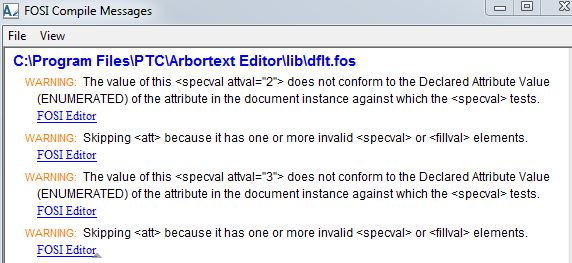
fosi.JPG

Thanks!

    Best answer by GarethOakes

    Perhaps there is an incompatibility between your 5.x customisations/configuration and 7.x release. It would need some debugging.

    1 reply

    16-Pearl
    February 8, 2016

    I'm pretty sure if it's using dflt.fos that means Arbortext did not find the stylesheet for your DTD, meaning your custom FOSI is not loaded. You should have an APTCUSTOM environment variable that is pointing to the custom folder containing all your doctypes, so that is a good place to start debugging .. or you can have a look at "Select Stylesheets" under the Format menu. Help->Session->Document will also show some helpful information.

    rmcgarvey1-VisitorAuthor
    1-Visitor
    February 9, 2016

    Hi Gareth,

    Thanks for the note.  All of the visual settings from our custom FOSI are displaying normally, like our font sizes, colors, indentation, numbering, etc.  The dflt.fos reference in the error window is throwing me off since there's no need to reference it. I didn't expect both a custom FOSI and the dflt.fos to both be used in a document.

    Checking the stylesheet selection shows that I'm using the one in the DTD folder as I'd expect.  The APTCUSTOM variable correctly points to our custom ZIP file that contains the doctypes and dialog folder with the latter containing updates with some extra toolbars.  I don't see anything amiss there.  What might we have missed with this upgrade? 

    1-Visitor
    March 28, 2018

    Was this ever resolved? I am seeing the exact same problem ...