
1-Visitor
December 4, 2014
Solved

How to include BOM table(Illustrated Part List) in Arbortext Editor?

  • December 4, 2014
  • 2 replies
  • 2572 views

HI,

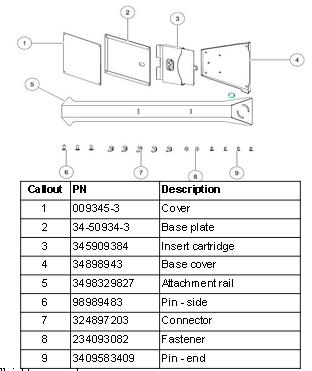
I want to add BOM table in Arbortext for a service manual. I am adding BOM table manually in the Editor. I would like to know if there is any other way to add BOM table automatically in the Editor.
ScreenShot010.jpg

    Best answer by hmungekar

    Hi,

    I was not using Service Information Manager. Now I have started using SIM approach which has solved my problem. Thanks for your time and advice.

    Sorry for late reply.

    2 replies

    12-Amethyst
    December 18, 2014

    Have you worked with Windchill Service Information Manager?

    Is the table content in Excel or a comma separated list? If so, have you attemped to copy and then paste into Arbortext Editor using Edit > Paste Excel?

    See Arbortext Help Center topic "Importing Excel tables".

    hmungekar1-VisitorAuthorAnswer
    1-Visitor
    January 29, 2015

    Hi,

    I was not using Service Information Manager. Now I have started using SIM approach which has solved my problem. Thanks for your time and advice.

    Sorry for late reply.

    12-Amethyst
    January 27, 2015

    Have you been able to resolve this issue?

    Did the suggestion help?

    1-Visitor
    August 31, 2015

    We're facing this issue as well, but we do not have Service Information Manager. Whenever we Paste -> Excel, it brings over a blank table. All of the table dimensions are maintained from the Excel spreadsheet, but none of the content carries over.

    Is there any way to bring the content over as well as the cell/table dimensions?