
1-Visitor
October 19, 2016
Question

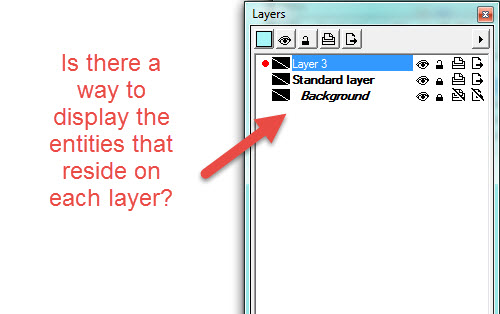
In the Layers Window in IsoDraw CADprocess 7.3, how do I display a list of entities, such as curves, text, etc., that reside on each layer?
  • October 19, 2016
  • 1 reply
  • 2698 views

In the Layers Window in IsoDraw CADprocess 7.3, how do I display a list of entities, such as curves, text, etc., that reside on each layer?

layers.jpg

1 reply

18-Opal
October 19, 2016

You need to open the objects layer also.

Bryon

smurphy-41-VisitorAuthor
1-Visitor
October 19, 2016

Thank you Bryon for your quick response. I really appreciate it.

I have another question. When I view the Objects window, I noticed that most of my elements aren't listed. Only elements that are grouped together are displayed as Group.

None of my elements have names. Is there a way to have elements automatically named?

Thank you!

objectwin1.jpgobject.jpg

18-Opal
October 19, 2016

I think it depends on the information in the imported file. We use solid edge to convert the file to a jt. Then we use the place command in IsoDraw to import the file. It seems to keep all the part numbers doing it this way.


Bryon

part numbers.jpg