
1-Visitor
October 19, 2016
Question

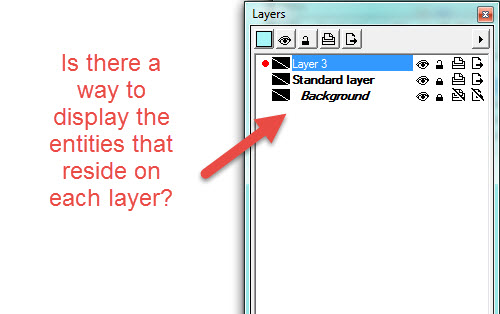
In the Layers Window in IsoDraw CADprocess 7.3, how do I display a list of entities, such as curves, text, etc., that reside on each layer?
  • October 19, 2016
  • 1 reply
  • 2698 views

In the Layers Window in IsoDraw CADprocess 7.3, how do I display a list of entities, such as curves, text, etc., that reside on each layer?

layers.jpg

1 reply

18-Opal
October 19, 2016

You need to open the objects layer also.

Bryon

smurphy-41-VisitorAuthor
1-Visitor
October 19, 2016

Thank you Bryon for your quick response. I really appreciate it.

I have another question. When I view the Objects window, I noticed that most of my elements aren't listed. Only elements that are grouped together are displayed as Group.

None of my elements have names. Is there a way to have elements automatically named?

Thank you!

objectwin1.jpgobject.jpg

smurphy-41-VisitorAuthor
1-Visitor
October 19, 2016

Thank you Bryon.

I will try other methods of importing graphics to see if that makes a difference. The 3D CAD model is in NX10 (Unigraphics) and a dxf file was exported from a 2D view from the drawing. I opened the dxf file with IsoDraw and copy/pasted it into my IsoDraw file.  Apparently, this method does not bring any associated information with it. I have not had much experience with manipulating the 3D CAD model in IsoDraw, but I am in the process of learning how that works along with creating exploded views in IsoDraw from the CAD model. Currently, I am creating my exploded views in NX10 and exporting the 2D dxf into IsoDraw.

Thanks again for your help!

-Sally