
cancel
Showing results for 
Search instead for 
Did you mean: 
cancel
Showing results for 
Search instead for 
Did you mean: 

Community Tip - When posting, your subject should be specific and summarize your question. Here are some additional tips on asking a great question. X

Translate the entire conversation x

Setting Default Publishing Engine (PE) Stylesheet when Publishing through the PE Server

JHollis
10-Marble

Setting Default Publishing Engine (PE) Stylesheet when Publishing through the PE Server

I am running Arbortext 8.2.2.1 and using it in conjunction with Windchill 13.0.2.9.


We are trying to publish our manuals in PDF using the Arbortext Publishing engine (PE) with content stored in Windchill.

When I try to change the default stylesheet to our local company stylesheet, I do not have the option to change it. 

Selecting File > Publish > PDF File opens up the Publish to PDF File window.  Under Publishing, there is only the (pe) Standard DITA 2.0 Styler Stylesheet available from the dropdown menu.
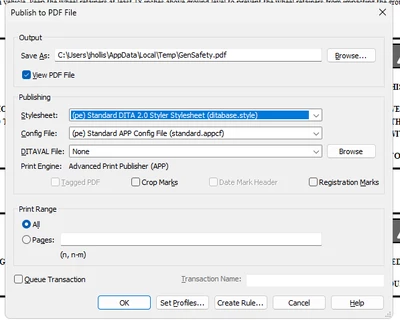
JHollis_0-1765298324296.png


Where, and how, do I import our company stylesheet so I can replace the (pe) Standard stylesheet.

Working in a local (non-Windchill) environment, there is usually a Browse button beside the Stylesheet selection where I can select from many available stylesheets, but not when running through the Publishing Engine Server.


John


3 REPLIES 3

The stylesheets need to be saved on the publishing engine (PE). We have a custom application that is used for each users computer and the PE. We have our stylesheets saved in the techinfo folder. Please check out this help topic

 https://support.ptc.com/help/arbortext/r8.3.2.0/en/index.html#page/editor/editor_help/help5729_2.html


Arbortext Publishing Engine can automatically find stylesheets placed in the Arbortext-path\custom\doctypes\doctype directory on the Arbortext PE server. The setting of the allowComposeStylesheetList attribute of the Options element is configured in the document type configuration file (.dcf) on the server. The order of stylesheets presented in the Stylesheet list can be controlled by configuring PEStylesheetOrder in the .dcf.
You can use the following options to specify the default publishing stylesheets:
set printstylesheet
set htmlstylesheet
set htmlhelpstylesheet
set webstylesheet
set epubstylesheet
 
Configuring Stylesheet Order in a List
 
Bryon
manpsingh
12-Amethyst
(To:JHollis)

Hello John,


Hope you're doing well. Please refer the below articles about stylesheet selections when publishing the document.


https://www.ptc.com/en/support/article/CS72298

https://www.ptc.com/en/support/article/CS430357

https://www.ptc.com/en/support/article/CS120331


Please let me know if you've any questions, thanks.


Regards,

Manpreet Singh

Hello @JHollis


It looks like you have some responses from some community experts. If any of these replies helped you solve your question please mark the appropriate reply as the Accepted Solution. 

Of course, if you have more to share on your issue, please let the Community know so other community members can continue to help you.

Thanks,
Vivek N.
Community Moderation Team.

Announcements

Top Tags