
1-Visitor
June 10, 2014
Solved

Text Alignment

  • June 10, 2014
  • 3 replies
  • 1334 views

Hi everyone,

I've been facing an issue regarding text alignment. I've included an example of what our text looks like below:

Text+Alignment.png

Is there any way to make the text all line-up under the "you" at the beginning? It should look like the text below:

WARNING: YOU MUST MAKE SURE THAT YOU CAN

HOLD THE RADOME BEFORE YOU REMOVE/

INSTALL IT. THE RADOME IS HEAVY. IF IT FALLS,

IT CAN CAUSE INJURY TO PERSONNEL AND

DAMAGE TO THE EQUIPMENT.

I've also included images of the FOSI below:
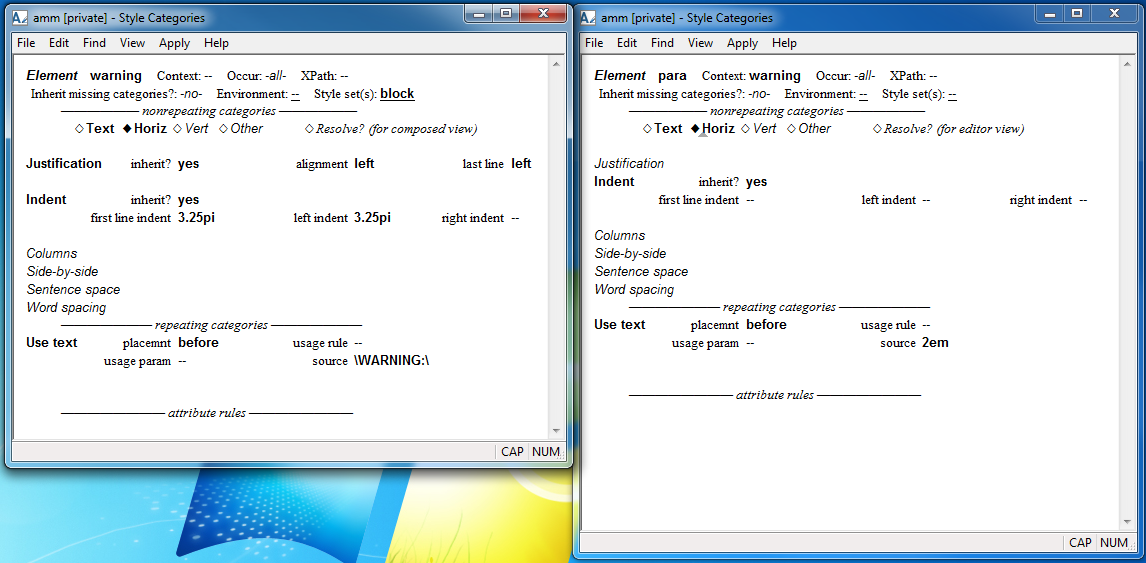
Text+Alignment+FOSI.png

    Best answer by SuzanneNapoleon

    With FOSI, this is done with a hanging indent and a kern-to, which is like a tab stop. For example (in pseudo-code):

    e-i-c gi=warning

    indent inherit=1 firstln=*-4.5pi leftind=4.5pi

    usetext source=\WARNING:\

    e-i-c gi=para context=warning occur=first

    usetext source=@4.5pi

    This approach is also used for hanging lists.

    3 replies

    1-Visitor
    June 10, 2014

    The simplest (probably) is two separate pieces of text. Place one offset and reference the other to keep them together.

    16-Pearl
    June 11, 2014

    In APP you can handle this via the "relative indent" function <?ri>. In FOSI you should use the "side by side" feature.

    12-Amethyst
    June 11, 2014

    With FOSI, this is done with a hanging indent and a kern-to, which is like a tab stop. For example (in pseudo-code):

    e-i-c gi=warning

    indent inherit=1 firstln=*-4.5pi leftind=4.5pi

    usetext source=\WARNING:\

    e-i-c gi=para context=warning occur=first

    usetext source=@4.5pi

    This approach is also used for hanging lists.