
13-Aquamarine
December 9, 2015
Solved

arbortext editor: strange behaviour if deleting a character after an element

  • December 9, 2015
  • 1 reply
  • 1632 views

Hi,

we use the Arbortext Editor Version 6.1. If we delete a character after an inline element, arbortext deletes also the space:

You can see this in this example:

As you can see, the cursor is placed after the emphasis - element.
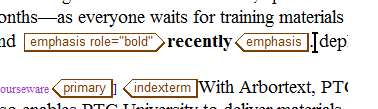
space_before.png

If we would like to delete the point character with backspace, Arbortext deletes also the space character:

space_deleted.png

That is absolutely not desired. Is there maybe a setting/option to change this behaviour?

Thank you for your help in advance.

Best answer by ClayHelberg

Hi Hubert--

Try this:in Preferences, click Advanded, find the "deletespaces" option, and set to "off".

Or, in an ACL startup script, add the line

     set deletespaces=off

--Clay

1 reply

18-Opal
December 9, 2015

Hi Hubert--

Try this:in Preferences, click Advanded, find the "deletespaces" option, and set to "off".

Or, in an ACL startup script, add the line

     set deletespaces=off

--Clay

hbestler13-AquamarineAuthor
13-Aquamarine
December 10, 2015

Hi Clay,

perfect! That was exactly what we were looking for.