

Issue: STL parts in an assembly separate when 3D printed
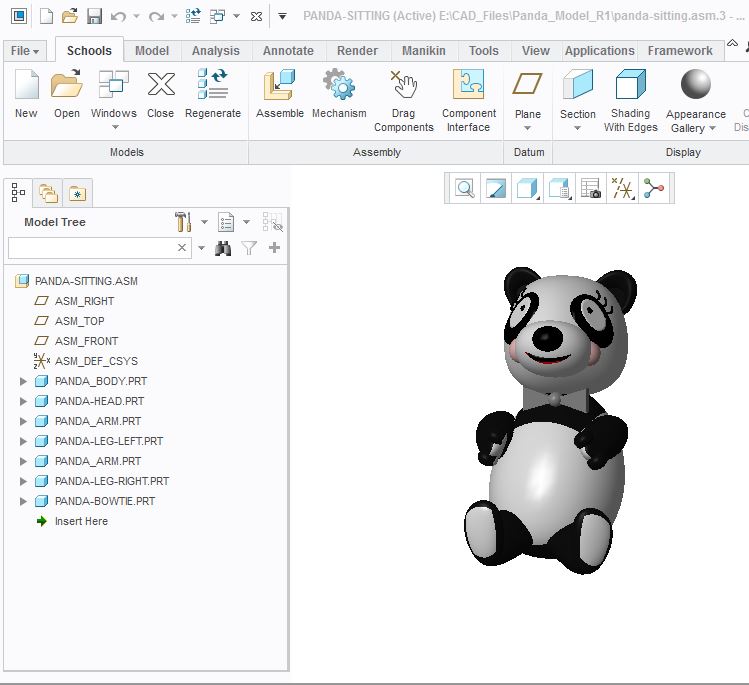
I have made several models in Creo supporting our FIRST Robotics team. I've noticed on many occasions, that when I print these (Fusion F306 printer or others), the models often separate along the intersection boundaries of where one part has been placed inside another for the combined Assembly. For example, in the Panda bear screenshot below, the legs will print as posed, but separate easily along their original part lines when the model is handled. I believe the cause is that the triangles defining each part don't merge into one another for a true solid model assembly.
For a better assembly, I would love to apply a fillet or other material, or perform some operation that "merges" or stitches these parts into 1 solid mass. We are certainly getting good parts, using the "solidify" command during creation, and passing the model inspection tools. When I print parts alone (not assemblies), they come out just fine, even when they involve several intersected primitives, such as the panda_head in my model below. Typical chord length for STL generation has been 0.01 to 0.001", with 0.5 step angle. We use Solidify 3 for our slicing/g-code generation.
I welcome your input, and have provided my Creo parts for sharing, criticism and analysis.
This thread is inactive and closed by the PTC Community Management Team. If you would like to provide a reply and re-open this thread, please notify the moderator and reference the thread. You may also use "Start a topic" button to ask a new question. Please be sure to include what version of the PTC product you are using so another community member knowledgeable about your version may be able to assist.