1-Visitor
October 4, 2014
Solved

dialog box is bigger than my screen

  • October 4, 2014
  • 3 replies
  • 10982 views

hello everybody i have a problem with advanced framework extintion (AFX) that is some dialog boxes are bigger than my laptop screen (i have 15.4 screen).

so i cant sellect all the options . is there any one knows how to solve this problem ? thanks

Best answer by Mahesh_Sharma

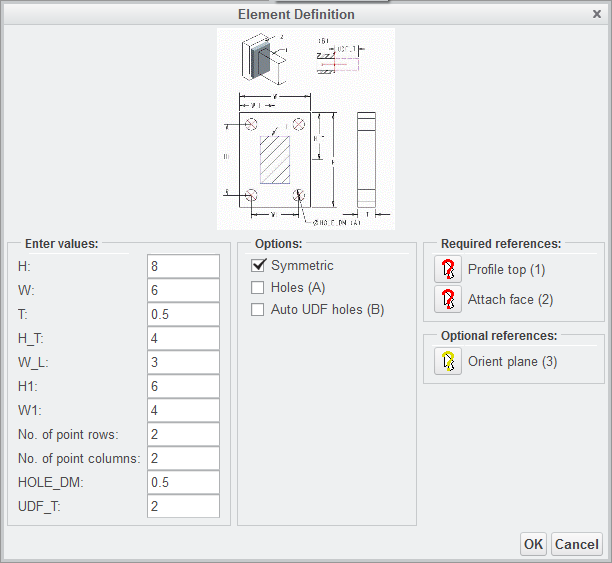
As all members mentioned this is due to screen resolution and in that dialog box, size of dialog box is increasing due to image/picture in that. If I have that machine and need to complete my project, I will prefer to remove that image from dialog box and have only input area (and I will keep a copy of picture which can be referred externally).

Image files are available in installation location of efx, in case of your uploaded picture file.

Browse to <Creo Install location>\Common files<Datecode>\efx\ parts\connectors\steel_construction_inch (or mm)\no_standard and rename endplate_align_size_tab.gif to endplate_align_size_tab.gif_custom

endplate_tab.gif to endplate_tab.gif_custom. This will remove the image from dialog boxes.

OR

I will open the *.gif files externally and change the Width and Height pixels.

Dialog box without picture:
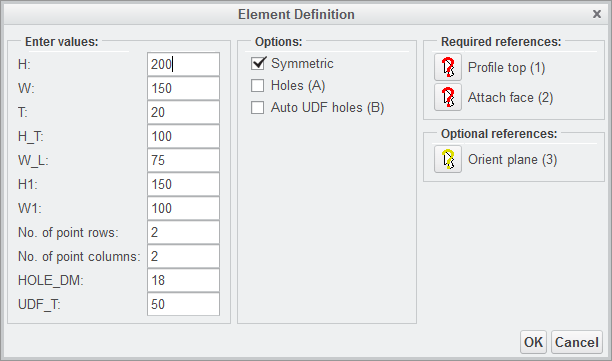
Dialog.png

Dialog box with modified pixels:

dialog1.png


3 replies

23-Emerald IV
October 5, 2014

What is your screen resolution set at? Creo (1, 2, and 3) has a minimum supported screen size of 1280 x 1024. Some wide format and laptop screens have less vertical resolution than this (~900).

If you have at least 1024 of vertical resolution, then I would think a support case should be opened.

1-Visitor
October 5, 2014

hello tom

i have a maximum resolution of 1366 x 768

1-Visitor
October 5, 2014

Tom is correct - the attached image is only 768 pixels high, suggesting that is the resolution of the laptop screen.

It is for certain that since screens are almost always wider than tall, that the contents of the requester could have been rearranged to better fit a landscape screen or, better yet, that the software dynamically allocate content in the requester to that it does fit, even if it requires adding scrolling.

23-Emerald IV
October 5, 2014

AFX is a 3rd party product built by B&W in Germany that is bundled with Creo. I haven't seen all their products, but the ones I have seen have never had scroll bars on the dialogs. I'm pretty sure they don't use "normal" Windows dialog boxes (with minimize, maximize, or resize capabilities) but rather custom made, fixed size ones. Even if PTC's own internal dialogs were resizable, I don't think these will be until they have a major rewrite of their GUI.

5-Regular Member
October 17, 2019

Dear Sir,

can u tell me that, how to reduce the size of dialog box in creo

22-Sapphire I
October 6, 2014

As all members mentioned this is due to screen resolution and in that dialog box, size of dialog box is increasing due to image/picture in that. If I have that machine and need to complete my project, I will prefer to remove that image from dialog box and have only input area (and I will keep a copy of picture which can be referred externally).

Image files are available in installation location of efx, in case of your uploaded picture file.

Browse to <Creo Install location>\Common files<Datecode>\efx\ parts\connectors\steel_construction_inch (or mm)\no_standard and rename endplate_align_size_tab.gif to endplate_align_size_tab.gif_custom

endplate_tab.gif to endplate_tab.gif_custom. This will remove the image from dialog boxes.

OR

I will open the *.gif files externally and change the Width and Height pixels.

Dialog box without picture:

Dialog.png

Dialog box with modified pixels:

dialog1.png


1-Visitor
October 6, 2014

thanks , it really works ..many thanks