1-Visitor
June 5, 2012
Solved

Flat pattern of a part which was created using a Swept Blend

  • June 5, 2012
  • 2 replies
  • 13068 views

Hello, everyone!

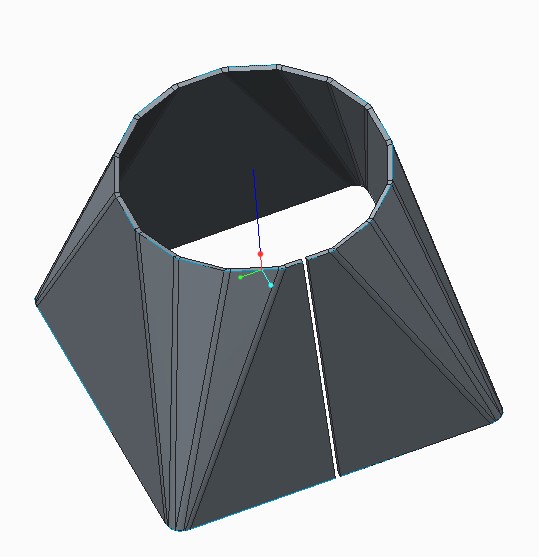
I would like to get a flat pattern of a part, which was created using a Swept Blend in the Sheetmetal Module of Creo Parametric.

This Swept Blend consist of two sections. Each of them has the same quantity of segments. I used a Convert Tool to add bends on sharp edges to round sharp edges.

But when I was trying to create a flat pattern of this part, Creo displayed a warning message that there is no geometry to unbend.

Does anybody know how to solve this problem?

I attached a picture and a model of this part.

Thank you in advance.

Best regards, Vladimir.
q1.jpg

2679_20104.jpg


This thread is inactive and closed by the PTC Community Management Team. If you would like to provide a reply and re-open this thread, please notify the moderator and reference the thread. You may also use "Start a topic" button to ask a new question. Please be sure to include what version of the PTC product you are using so another community member knowledgeable about your version may be able to assist.
Best answer by Vladimir_G

Hello, Davor, Antonius!

Thank you for your help.

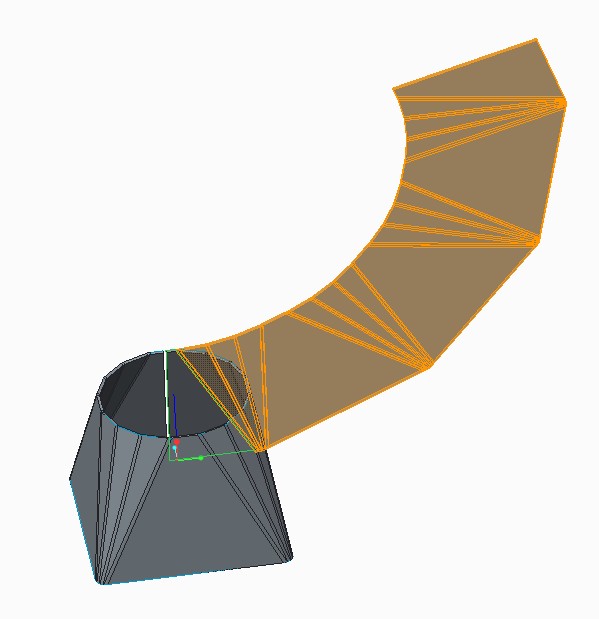
Eventually I managed to get the flat pattern of my model.

a1.jpg

The problem was that some of the sides of my part were twisted. That happend because the lines on the opposite sections, which I used to make the Boundary Blend, weren't parallel to each other.

a2.jpg

Best regards, Vladimir.

2 replies

17-Peridot
June 5, 2012

There may not be enough "flange" along the bottom through the radii to unbend. Maybe try making the triangles parallograms instead.

1-Visitor
June 6, 2012

Hello, Antonius.

Thank you for you advice. I've tried it but unfortunately it didn't help.

I also attempted to create this part using the Boundary Blend tool. The result was the same. Creo displayed a warning message that there is no geometry for unbending.

q1.jpg

That's strange, because I imported much more complicated part which was made in Inventor 2012 and got its flat pattern without any difficulties.

q2.jpg

Best regards, Vladimir.

17-Peridot
June 6, 2012

I played with your part a little bit last night. I don't have the full version of sheet metal appearantly because I couldn't blend with thickness or radii. Makes the default sheetmetal kind of useless for me although I do a lot of boxes and panels. I just rarely need to unfold anything so no biggy. I know how to calculate my own bend allowances.

As for why your part won't unfold, I do not know. I was a bit surprised as to how the two sketches meshed with a few extra lines connecting them.

I think I'll stick to the simple stuff for now. So many things I know are there but just can't find it on the new interface. Give me the old 2000i legacy intereface and I can fly

16-Pearl
June 6, 2012

Hi Vladimir,

You have same problem answered here http://communities.ptc.com/message/165189#165189

You also have part that can be unbent there for download.

Cheers

1-Visitor
June 6, 2012

Hello, Davor.

Thank you for your answer.

Actually, I've seen your model before. That's great. I repeated it step by step and flatten it.

That is the reason why I attempted to use the Boundary Blend tool for my part.

But I would like to exchange every conical bend for four angled bends in order to create a Table of Bends (as you can see in the picture above). I would like to show bend lines in a view with a flat pattern and point the value of the angle of each bend in the table of bends.

When I try to use your technique for my part it doesn't work. I can't flatten the model.

Best regards, Vladimir.

P.S.: There is an option in Lofted Bends tool in SolidWorks which is called Bend Line Control. It enables you to set the number of bend lines for conical bend.

That's what I'm looking for in Creo Parametric.

b1.jpg

b2.jpg

16-Pearl
June 6, 2012

I guess you need to put it in "idea" area as a enhancment request.

Maybe you can make quilt from outer surface and flatten it then use Flatten Quilt Deformation tool on solid part. To me its too much work. PTC must make something simpler.