

Question
How to Create filled symbol/font in special.src ?
Hi,
We want to add custom symbol in text symbol. In this we have added symbol but not able to create it filled,
if we give polygon 1 at top then it create all symbol as filled. and if we add polygon only for required symbol then it will not work. So please can anyone guide for proper syntax to add filled symbol.
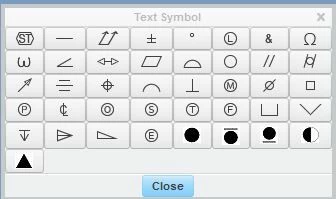
We have added below syntax but not working. So please can someone guide.
" code 155 101"
polygons 1
m 18, 30
d 17, 30
d 13, 29
d 10, 27
d 9, 26
d 7, 23
d 6, 19
d 6, 18
d 6, 17
d 7, 13
d 9, 10
d 10, 9
d 13, 7
d 17, 6
d 18, 6
d 18, 30
polygons 0
m 18, 6
d 19, 6
d 23, 7
d 27, 10
d 29, 13
d 30, 17
d 30, 18
d 30, 19
d 29, 23
d 27, 26
d 23, 29
d 19, 30
d 18, 30
# symbol ("Triangle") symbol
" code 156 102"
polygons 1
m 2, 8
d 24, 8
d 11, 30
d 2, 8
Regards,
Prashant Pandarkar